

Disclosure: Rys Up Audio makes RysUpNoise Pro. NoiseWorks does not participate in this page. We rechecked VoiceAssist pricing, tiers, requirements, formats, host behavior, trial, and licensing on NoiseWorks official pages on August 25, 2026. We have not published a same source listening test between the two products, so this comparison does not invent a sound quality winner.
Why producers search for a VoiceAssist alternative
VoiceAssist is much more than a denoiser. That is both its advantage and the reason a focused alternative can make sense. NoiseWorks sells Basic at $49, Standard at $149, and Advanced at $299. Denoising and dereverberation are Advanced features. A customer whose actual problem is a fan beneath a lead vocal must therefore compare the $299 Advanced tier, not the $49 Basic tier, against a focused cleanup plugin.
Hardware also changes the decision. NoiseWorks currently requires at least 16 GB RAM and a dedicated NVIDIA or AMD graphics card for VoiceAssist on Windows. It recommends 6 GB VRAM, warns that 4 GB can be unreliable, and says integrated graphics are unsupported. Producers on ordinary Windows laptops have a practical reason to evaluate a local alternative that does not list that dedicated GPU requirement.
The third reason is workflow. ARA can be excellent when the host binds it, but not every DAW and architecture follows the same path. VoiceAssist includes Transfer Mode for non ARA hosts. RysUpNoise Pro includes HQ Transfer and optional ARA 2 where the host binds it. Both recognize that capture based processing is not a second class workflow. It is the reliable route when direct region access is unavailable.
RysUpNoise Pro versus VoiceAssist Advanced in ten dimensions
| Decision | RysUpNoise Pro | NoiseWorks VoiceAssist Advanced | What it means |
|---|---|---|---|
| 1. Current price and cleanup tier | $49.99 perpetual. Included with active or perpetual RysUpSuite. | $299 perpetual, or $25 monthly for 12 months. Basic is $49 and Standard is $149, but denoise and dereverb are Advanced only. | Compare RysUpNoise Pro against Advanced for cleanup intent. Comparing it against Basic hides the actual VoiceAssist denoise price. |
| 2. Local processing and cloud behavior | Both packaged neural engines run on the computer. The vocal is not uploaded to a cleanup service. | NoiseWorks says processing happens directly on the machine with no cloud processing. | Both are privacy friendly local choices. Local does not mean identical hardware cost or speed. |
| 3. Hardware requirements | Universal Mac and Windows 64 bit builds. No dedicated GPU requirement is listed for the shipped plugin. | macOS 13 or later, Apple Silicon M1 through M4, minimum 16 GB RAM. Windows 10 version 1909 or later, minimum 16 GB RAM, and a dedicated NVIDIA or AMD GPU. 6 GB VRAM is recommended. | VoiceAssist Advanced has the more demanding stated Windows floor. Always trial it on the exact machine. |
| 4. Formats and operating systems | Universal macOS AU, VST3, and AAX for Apple Silicon and Intel. Windows 64 bit VST3 and AAX. | macOS and Windows. AU, VST3, and AAX according to NoiseWorks. | Both cover the major native plugin formats. Rys Up states the Mac architectures and Windows format set directly. |
| 5. ARA hosts and native Apple Silicon Logic | ARA 2 where the host binds it. Native Apple Silicon Logic uses HQ Transfer. Logic running in Rosetta can bind the ARA extension. | NoiseWorks lists Pro Tools 2024.10 or later, Cubase, Nuendo, Reaper, Studio One, LUNA, Logic Pro in Rosetta, Samplitude Suite, and Sequoia. | Neither product should be sold as native Apple Silicon Logic ARA. Use the transfer workflow there. |
| 6. Non ARA transfer workflow | HQ Transfer records the passage, runs the HQ model, lets you audition Original, Denoised, or Removed, then exports WAV. | Transfer Mode captures audio into VoiceAssist, then uses the same editing workflow as ARA. | Both keep you inside the DAW session when direct region access is unavailable. |
| 7. Live, HQ, standalone, and AudioSuite | Real time Live model plus HQ Transfer. No standalone app or dedicated AudioSuite workflow is advertised. | ARA, Pro Tools AudioSuite, Transfer Mode, and an Advanced standalone application. VoiceAssist processing is region and transfer centered rather than a RysUpNoise style Live and HQ split. | Choose the surfaces you use every day. VoiceAssist has more offline and post options. RysUpNoise Pro has the direct real time path. |
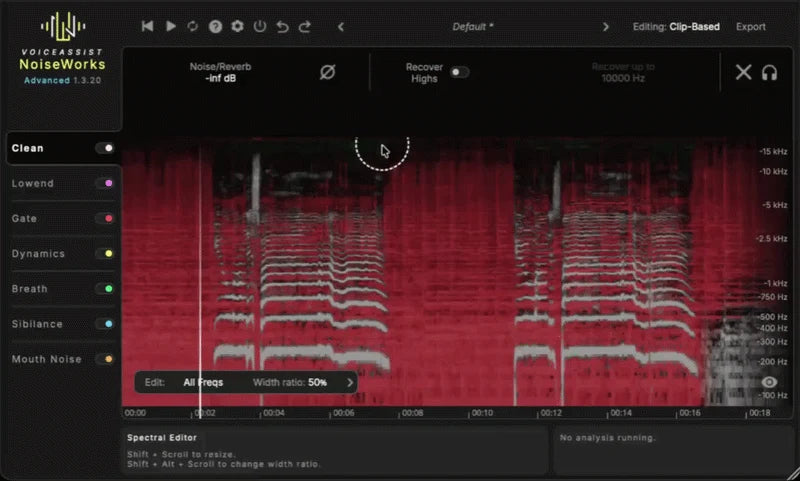
| 8. Editing and preparation scope | Focused AI Denoise and AI DeReverb, Live and HQ cleanup, Removed audition, plus targeted hum and de ess controls. No manual spectral editor, automatic leveling, mouth noise editor, breath regions, or content aware gate. | Denoise, dereverb, frequency restoration, spectral editing, low end tools, automatic leveling, mouth noise, breath detection, sibilance control, content aware gate, and editable regions across the relevant tiers. | VoiceAssist genuinely does more. RysUpNoise Pro is intentionally narrower. |
| 9. Licensing seats and trial behavior | RysUpHub activation on one machine at a time with self service transfer. No iLok hardware. No timed Noise Pro trial is advertised on the current product page. | Default NoiseWorks license includes two seats. Optional iLok is available for Advanced. The official page advertises a 14 day unlimited trial with no credit card details needed. | VoiceAssist wins on trial access and simultaneous seats. Rys Up keeps device transfer and activation in its own Hub. |
| 10. Matched audio evidence | Two separate Rys Up before and after pairs for AI Denoise and AI DeReverb. Each after is loudness matched to its own before and available on the product page. | NoiseWorks publishes its own product examples and testimonials. This page does not claim they use the same source as the Rys Up examples. | There is proof for each vendor's product, but no disclosed same source bakeoff here. Do not turn separate demos into a fake head to head result. |
Listen to the two RysUpNoise Pro restoration jobs
Noise removal and room reflection removal should not be hidden inside one vague before and after. These are two separate, internally level matched demonstrations so you can hear what each workflow is meant to solve.
Fan, AC, room tone, and background wash. AI DeReverb proof
Room reflections and excess reverb around the vocal.
The examples demonstrate RysUpNoise Pro. They are not represented as the same files processed through VoiceAssist.
Where RysUpNoise Pro is stronger
The main job is cleaning a music vocal
RysUpNoise Pro begins with the room problems that show up in independent vocal sessions: computer fan, AC and HVAC wash, room tone, electrical hum, and excessive room reflections. Live mode lets the producer hear a cleaner signal while the session moves. HQ Transfer gives the take a more deliberate model pass and keeps the result available for review before export.
You want the AI model to do the restoration, not a feature stack to run the session
The Rys Up workflow is intentionally direct. Capture when HQ is needed, run the local model, compare the original and reconstructed audio at the same playhead, inspect the Removed signal, then export only when the result earns it. There is less editing scope, but also less setup between a noisy vocal and a decision.
You are on a Windows machine without a dedicated GPU
VoiceAssist says a separate NVIDIA or AMD GPU is required on Windows and that integrated graphics are unsupported. RysUpNoise Pro does not publish that dedicated GPU requirement. That can make the difference for a producer using a normal Windows laptop rather than a gaming or post production workstation.
You want a focused perpetual purchase
RysUpNoise Pro is $49.99 as a perpetual individual plugin. It is also included with active or perpetual RysUpSuite. VoiceAssist Advanced is $299 because it covers more of the vocal preparation chain. If you do not need that extra chain, the narrower purchase is easier to justify.
Where VoiceAssist Advanced is stronger
You want one complete vocal or dialogue preparation environment
VoiceAssist does not stop at cleanup. It can level the performance, create editable automation, control mouth noise, detect breaths and sibilance, clean pauses with a content aware gate, restore high frequencies, manage low end, and expose spectral editing. Those are meaningful tools for dialogue editors, broadcast teams, vocal editors, and engineers handling many raw takes.
You need AudioSuite or a standalone application
NoiseWorks lists Pro Tools AudioSuite and an Advanced standalone application in addition to ARA and Transfer Mode. RysUpNoise Pro does not advertise a standalone app or a dedicated AudioSuite render workflow. VoiceAssist is the better fit when those delivery surfaces are required.
You want to edit model decisions by region
VoiceAssist is designed around editable regions and a manual spectral workflow. That makes sense when the engineer needs to fix one word differently from the next or document detailed post decisions. RysUpNoise Pro prioritizes a focused Live or HQ pass rather than becoming a full visual editor.
You need two seats or a full trial before buying
The default VoiceAssist license includes two seats, and NoiseWorks offers a 14 day unlimited trial. Rys Up licenses activate on one machine at a time and transfer through RysUpHub. VoiceAssist is more generous if simultaneous studio and laptop activation is a requirement.
Four more VoiceAssist alternatives worth testing
Waves Clarity Vx Pro
Best for: advanced six band real time voice noise control. The official page showed $249 against $699 MSRP and describes Waves Neural Networks processing.
Limit: it is a noise specialist, not a full VoiceAssist style preparation workspace.
Supertone Clear
Best for: compact control of Voice, Ambience, and Voice Reverb for $69 displayed.
Limit: three direct controls do not replace VoiceAssist leveling, region editing, mouth noise, breaths, gate, or spectral editing.
iZotope RX 12 Standard
Best for: a $399 repair suite that covers noise plus clicks, clipping, hum, bleed, plosives, reverb, and spectral work.
Limit: broad repair scope means more cost and more decisions than a focused vocal tool.
Accentize dxRevive Pro
Best for: local neural restoration of compromised dialogue and frequency balance at €299 including VAT.
Limit: it is dialogue first and requires a free iLok account for the Pro license.
Which VoiceAssist alternative fits your workflow?
- Music producer with fan, AC, room tone, hum, or room reflection: start with RysUpNoise Pro.
- Dialogue editor who wants the whole preparation chain: VoiceAssist Advanced may still be the correct choice.
- Real time mixer who wants detailed band control: test Clarity Vx Pro.
- Creator who wants separate noise and reverb knobs: test Supertone Clear.
- Repair engineer solving several kinds of damage: test RX 12 Standard.
- Post engineer restoring compromised speech: test dxRevive Pro.
How to switch without damaging a session
- Keep the original plugin active in old projects. Do not replace a working VoiceAssist instance just to standardize the plugin list.
- Test one duplicate region. Use a phrase containing noise, reverb, breaths, and soft consonants.
- Level match the outputs. Compare tone and artifacts, not loudness.
- Use the right RysUpNoise Pro mode. Start with Live for a quick decision. Use HQ Transfer for a reviewed render. In native Apple Silicon Logic, use HQ Transfer instead of expecting third party ARA.
- Print a safety version. Keep the original and processed files before removing any existing cleanup plugin from a project.
Use the host guidance on this page and the RysUpNoise Pro compatibility section for the current model, ARA, and Transfer Mode decisions.
Frequently asked questions
Is RysUpNoise Pro a replacement for every VoiceAssist module?
No. It is a focused local AI Denoise and AI DeReverb plugin with Live and HQ workflows. It does not claim to replace VoiceAssist automatic leveling, mouth noise editing, content aware gate, editable breath and sibilance regions, manual spectral editing, frequency recovery, standalone application, or AudioSuite workflow.
Which VoiceAssist tier includes noise removal and dereverb?
VoiceAssist Advanced. NoiseWorks lists Basic at $49, Standard at $149, and Advanced at $299. The Advanced feature table contains denoising and dereverberation.
Does VoiceAssist process audio locally?
Yes. NoiseWorks states that processing runs directly on the machine with no cloud processing. RysUpNoise Pro also runs its packaged models locally. Privacy is therefore not a reason to misrepresent either product.
Does RysUpNoise Pro work in native Apple Silicon Logic?
Yes, through HQ Transfer. Play the selected passage into the plugin, run the HQ model, audition the result, then export the WAV. Native Apple Silicon Logic is not presented as a third party ARA workflow. Logic running in Rosetta can bind the ARA extension.
Can VoiceAssist run without ARA?
Yes. NoiseWorks provides Transfer Mode for non ARA hosts. VoiceAssist Advanced also includes a standalone application, and Pro Tools users can use AudioSuite.
Which option is best for a normal home vocal?
If the main problems are fan noise, HVAC, room tone, hum, or excess room reflections, start with the focused RysUpNoise Pro workflow and hear the two matched examples. If the same take also needs automatic leveling, mouth noise editing, breath and sibilance regions, gate work, frequency restoration, or manual spectral edits, VoiceAssist Advanced can justify its wider scope.
Official sources checked August 25, 2026
- NoiseWorks VoiceAssist official product, price, tier, requirement, ARA host, Transfer Mode, AudioSuite, standalone, license, and trial page.
- NoiseWorks official VoiceAssist Basic, Standard, and Advanced buying guide.
- RysUpNoise Pro product page, current product configuration, signed format release, and two level matched demonstrations.
- Waves Clarity Vx Pro official product and price data.
- Supertone Clear official product, price, trial, and compatibility page.
- iZotope RX 12 Standard official product, price, module, and requirements page.
- Accentize dxRevive official product, price, license, and technical page.
Prices, promotions, formats, host support, operating systems, trials, and licensing terms can change. Confirm the vendor's current page and checkout before buying.
Host integration can decide whether the cleanup workflow feels instant or manual. Read the ARA versus transfer mode breakdown for the exact Logic Pro architecture answer.