
A vocal stutter effect works when the repeated slice follows the groove and the original word stays understandable. Grab one consonant or vowel, repeat it on a short musical division, automate the effect for a small window, and clear the path before the next lyric.
For a different automated transition, build the telephone vocal effect before chopping the phrase.
Disclosure: Rys Up Audio makes RysUpStutter. This guide shows both a manual edit and a focused plugin workflow. Product details and shipping files were checked September 2, 2026.
The fast answer: choose a clean syllable near the end of a line, start with a sixteenth note repeat, let the pattern run for half a beat or one beat, and place a tiny fade on every manual cut. If you use RysUpStutter, set Stutter for the slice length, set Refresh for when a new slice is captured, then automate bypass or Mix so the repeat appears only where the arrangement needs it.
What a vocal stutter effect actually repeats
A stutter edit repeats a very small part of the vocal in rhythm. The source can be the first consonant of a word, a vowel in the middle, or the last syllable before a transition. The effect feels intentional when the repeated fragment has a clear pitch or percussive edge and lands on a grid that supports the song.
Repeating the whole word usually sounds like a copy and paste mistake. Repeating a tiny slice turns the voice into a rhythmic instrument. Sixteenth notes create a familiar fast pulse. Eighth notes leave more of the syllable intact. Thirty second notes can become a texture, but they expose clicks and harsh consonants quickly.
The stutter should answer the lead, not cover it. Keep the clean vocal path available so the listener understands the phrase before the effect takes over.
Choose the slice before choosing the plugin
Listen for a fragment that survives repetition. Open vowels such as ah, oh, and eh stay musical. Hard consonants such as k, t, and p create sharp rhythm but can click when repeated too fast. S sounds can become painfully bright.
Start near a phrase ending because the stutter has room to speak without fighting a new lyric. A pickup into the next bar also works when the repeated fragment builds tension toward the downbeat.
Solo the chosen word, loop one beat around it, and mark three candidate points. Try the consonant, the vowel, and the tail. Pick the point that remains clear after four repetitions. This is faster than forcing one bad slice through filters and effects.
Build the manual version first
Zoom into the waveform and cut a sixteenth note fragment. Duplicate it across half a beat. Add a tiny fade at the front and back of every slice. Listen in context, then shorten or lengthen the fragment until the repeat locks with the drums.
One clear syllable or vowel
Start with a sixteenth note
Remove clicks at both edges
Use half a beat or one beat
Stop before the next lyric
The manual edit gives total control and prints exactly the same every time. It is best when the pattern happens once or when the vocal needs a unique hand drawn rhythm. The cost is time. Every rate change, pitch move, and new syllable needs another edit.
Pick the repeat grid by function
| Grid | Best use | Main risk |
|---|---|---|
| Eighth note | Clear word fragments and slower hooks | Can sound like a duplicate word |
| Sixteenth note | Most vocal stutters and transitions | Needs clean fades |
| Sixteenth triplet | Swing and tension before a downbeat | Can fight a straight drum pattern |
| Thirty second note | Fast texture and build effects | Harshness and obvious clicks |
Start with the simplest division that communicates the idea. Add a faster rate only for the final part of the pattern. A short sixteenth note run that accelerates into thirty second notes usually reads better than a full bar of constant speed.
Triplets work when the drums or melody leave space for them. If the groove is straight and busy, a triplet stutter can sound late even when it is technically on grid.
Separate slice length from capture timing
A focused beat repeater becomes much easier to control when two jobs are separate. The slice length determines how fast the captured sound repeats. The refresh interval determines when the processor grabs a new piece of audio.
In RysUpStutter, Stutter controls the repeated slice and Refresh controls the new grab point. Start with Stutter at a sixteenth note and Refresh at a half note or one bar. That creates a stable repeated fragment instead of grabbing a different sound on every tiny division.
Shorten Refresh only when you want the source to evolve during the pattern. If both values are extremely short, the result can lose the identity of the original lyric and turn into noise.
Automate the effect window, not the entire vocal
Place the plugin on an insert when you want the clean vocal to turn into the repeat. Automate bypass or Mix so the effect enters just before the chosen syllable and leaves before the next lyric. This makes the transition exact and keeps the rest of the performance untouched.
Use a send when you want the clean word and the repeated layer at the same time. Set the stutter return fully wet, automate the send, and keep the return below the lead. This is useful for ad libs and background textures.
Do not leave the effect active through silent gaps. A beat repeater can capture breath, headphone bleed, or room tone and repeat it perfectly. Automation is part of the sound design, not cleanup after the fact.
Keep the word understandable
Let the listener hear the clean beginning of the word before the first repeat. If the stutter starts too early, the phrase can become a machine sound with no lyrical anchor. If it starts too late, the transition feels pasted on.
Filter low rumble from the repeated layer and reduce harsh top end when the slice contains S or T sounds. Keep the clean lead centered. Pan or widen only the effect layer if the section needs size.
For ad libs, the repeat can sit behind the lead and answer the phrase. The ad lib mixing workflow shows how to create that role without letting every background vocal compete for the center.
Remove clicks before adding more effects
Clicks happen when a slice jumps between two waveform levels. Manual edits need tiny crossfades. Plugin repeats need a declick or crossfade system that protects slice boundaries. If the click remains, changing the slice start by a few samples can be more effective than adding a filter.
Check the effect at the loudest playback level you expect. A small click that hides during production can become sharp after limiting. Also check the exported file because live playback and offline rendering can expose different timing mistakes in a complicated session.
Do not smear the slice with long fades. The repeat needs a clear rhythmic front. Use the shortest fade that removes the discontinuity.
Use Freeze when one fragment should stay locked
Freeze holds one captured slice while the transport continues. Use it for a sustained transition, a repeated texture under a drop, or a moment where the same syllable must survive several bars.
Engage Freeze only after the intended fragment reaches the processor. If you capture too early, the effect can hold silence or the wrong consonant. Automate Freeze on the exact beat, then automate it off before the next section.
Long freezes benefit from movement. Change filter, pan, pitch, or effect depth gradually. Keep the repeat rhythm stable while one or two tone controls move. Changing every parameter at once makes the groove impossible to follow.
Add movement only after the rhythm works
Build the repeat with no extra effects first. Once the slice, grid, refresh point, and automation window feel right, add one movement idea. A filter can darken each repeat. A pan move can widen the tail. A short pitch motion can create a rise into the next section.
RysUpStutter includes 24 effects across 14 families. That depth is useful only after the base repeat is musical. Start with every module Mix at zero. Add one module, level match, and listen in the full mix.
A strong repeat pattern with one controlled movement beats a random rack every time. The vocal is still carrying a lyric and a transition job.
Run the focused RysUpStutter workflow
RysUpStutter is $49.99. Start with Stutter at a sixteenth note, Refresh at a half note, Mix at 100 percent on a send or at the required insert blend, and Freeze off. Automate the effect for half a beat. Adjust the slice first, then widen the capture interval if the plugin grabs the wrong word.
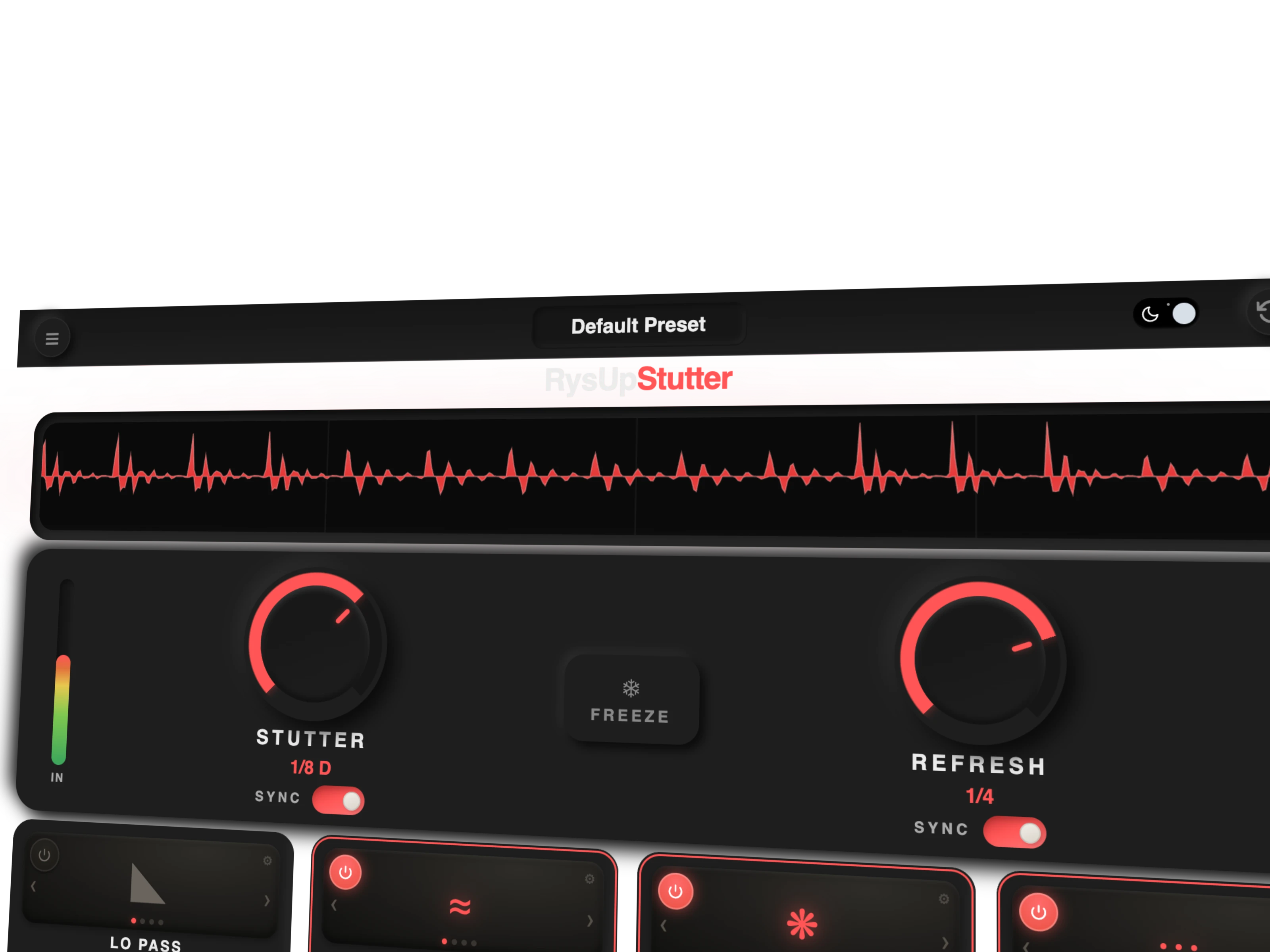
The live waveform shows the actual repeated audio, which makes it easier to confirm that the intended syllable was captured. Current shipping version 1.0.10 has macOS and Windows artifacts. The live product supports AU, VST3, and AAX. RysUpStutter does not accept MIDI input, so use host automation for exact effect entry and exit.
For the full paid lineup, use RysUpSuite. Browse the current plugins, then install through RysUpHub.
Use one repeatable listening test
- Choose one exposed phrase ending and one busy chorus transition.
- Build a sixteenth note repeat for half a beat with no extra effects.
- Move the capture point until the repeated syllable stays clear.
- Add tiny fades or verify the plugin declick removes every boundary click.
- Automate the effect off before the next lyric.
- Check the full mix, mono, headphones, low volume, and the final export.
- Add one movement effect only if the rhythm still needs a payoff.
Save the automation and routing as a template, but choose a new source slice for every song. The vocal performance should lead the effect.
Choose manual editing or a plugin by repetition
Use manual editing when the song needs one precise signature moment. It gives exact control, prints predictably, and does not require another processor. Use a plugin when the pattern changes rate, moves across several phrases, needs a frozen slice, or requires fast automation during arrangement.
The existing stutter effect plugin buyer guide compares product selection. This page owns the practical slice, grid, capture, automation, and click removal workflow. Keeping those jobs separate prevents two pages from chasing the same search intent.
Once the effect is finished, place it inside a complete decision path with the vocal chain plugin guide and keep the clean lead as the anchor.
Sources checked September 2, 2026: RysUpStutter product page, RysUpStutter update feed, Ableton Beat Repeat documentation, Apple Beat Breaker pattern guide, and Image Line Gross Beat product reference.
Want to create several playable syllables before repeating one? This vocal chop workflow covers Slicex, Simpler, and RysUpBeat. A stutter repeats one captured slice; these steps build a set of separate chops.