

TAL Vocoder 3

RysUpVocoder
TAL Vocoder review: it is one of the strongest free ways to learn real vocoder routing. The current version gives you an eleven band design, a built in carrier synth, MIDI control, sidechain modes, Linux support, and enough shaping to make a convincing early 80s robot voice.
The catch: many old tutorials teach a left and right channel trick that TAL removed in version 3. Use the current Input Mode menu instead. If you want faster layered vocals with pitch, formant, key guidance, harmony, width, and finishing controls in one window, RysUpVocoder is the focused paid route.
Disclosure: TAL Vocoder is made by TAL Software and is listed in its free plugin catalog. Rys Up Audio makes RysUpVocoder. We checked the current TAL product page, manual, and Rys Up release records on August 21, 2026. We did not run a universal sound quality contest, so this guide does not invent a sonic winner.
The TAL Vocoder verdict in 30 seconds
Choose TAL Vocoder
You want a free vintage eleven band vocoder, an internal oscillator carrier, current sidechain routing, Linux support, or detailed band level shaping.
Choose RysUpVocoder
You want two independently shaped vocal layers, voice or MIDI drive, pitch, formant, key guidance, harmony, dynamics, clarity, width, FX, and output controls on one focused surface.
TAL is not a fake free teaser. Its current product catalog places TAL Vocoder under Free Plug Ins and the product page provides version 3.0.4 downloads. RysUpVocoder costs $29.99 outright or comes with RysUpSuite from $9.99 per month on annual billing while the subscription remains active.
What TAL Vocoder 3 actually gives you
TAL describes the plugin as a vintage style vocoder inspired by early 80s hardware. It splits the analysis into eleven frequency bands and combines analog modeled components with digital algorithms. The carrier section includes pulse, saw, sub oscillator pulse, and noise sources. The sub oscillator plays one octave lower.
The current official download is version 3.0.4. TAL lists VST, VST3, AU, AAX, and CLAP across the product header. The Linux download is specifically labeled for 64 bit VST2 and VST3. Windows requires a 64 bit host on Windows 7 or newer. macOS requires a 64 bit host on macOS 10.9 or newer and supports Intel plus Apple silicon. TAL does not offer a standalone version.
The manual also documents chorus, Compand, release, harmonic emphasis, consonant support through Ess Int, modulator and carrier input meters, and level control for every analysis band. That is a real sound design surface, not one giant mystery knob.
Stop using the retired left and right trick
This is the most important update in the whole guide. TAL says version 3 removed the old left channel and right channel input routing. The current build replaces it with flexible sidechain modes. A tutorial that tells you to pan the voice and synth to opposite channels is teaching an older workflow.
Open the Input Mode menu in the current interface. Decide which signal enters through the plugin channel, which enters through the sidechain, and whether MIDI should drive the internal carrier. The labels look compact, but the logic is simple once you separate carrier from modulator.
The fastest TAL Vocoder setup
- Put a clear vocal on an audio track.
- Insert TAL Vocoder on that vocal track.
- Leave the default route at MIDI C and Audio M.
- Create a MIDI track and route its output to the TAL Vocoder instance.
- Play one held MIDI note while the vocal phrase plays.
- Watch the Mod In meter and raise the input only if the vocal is too quiet.
- Blend pulse, saw, sub, and noise until the words become readable.
The plugin creates output only when the carrier and modulator are both present. The vocal supplies the words. The internal oscillator supplies the pitched harmonic body. If either one disappears, the result is silence.
In Ableton Live, TAL says to place the plugin on the audio channel with the voice and route MIDI to it with MIDI To. In Logic Pro, load it as a MIDI controlled effect on a stereo instrument channel, choose the vocal track as the sidechain, confirm the Mod In meter moves, and play MIDI while the vocal runs. The manual includes separate current routes for Reaper, Bitwig, and Pro Tools.
For the editable vocal chain around that Ableton route, compare the Ableton vocal preset collection.
For a repeatable session, save TAL Vocoder as the creative layer after an editable Reaper vocal preset chain instead of baking the effect into every lead.
What every TAL input mode means
| Mode | Carrier source | Modulator source | Best use |
|---|---|---|---|
| MIDI C | Internal synth played by MIDI | Choose Audio M or SC M | The fastest classic talking synth route |
| Audio C | Current plugin channel | Sidechain when paired with SC M | Use audio as the carrier instead of the internal synth |
| SC C | Sidechain input | Current channel when paired with Audio M | Route a separate synth into the carrier input |
| Audio M | Internal MIDI synth or sidechain | Current plugin channel | Put TAL on the vocal track |
| SC M | Internal MIDI synth or current channel | Sidechain input | Put TAL on an instrument track and bus the voice in |
The letter C means carrier. The letter M means modulator. Pick one of each. That is the whole map.
Make TAL Vocoder words easier to understand
Start with a clean vocal that has obvious consonants and a carrier with enough upper harmonics. A deep sine wave gives the analysis bank almost nothing to reshape. Pulse and saw sources are easier starting points because their harmonic content gives the words more material.
- Raise Compand when quiet syllables disappear.
- Use Ess Int when S and T sounds vanish from a dark carrier.
- Shorten Release when one word smears into the next.
- Add Harmonic when the carrier needs more useful upper content.
- Shape the eleven band faders only after the route works.
- Use Chorus after the words read clearly in mono.
Do not push every clarity control at once. Change one setting, level match the result, and listen inside the beat. More edge can improve speech in solo while making the layer fight the lead vocal.
Fix TAL Vocoder when it makes no sound
The Mod In meter is dead
The voice is not reaching the modulator input. Check the audio clip, channel, sidechain source, and Input Mode choice.
The Car In meter is dead
The carrier is missing. Play MIDI for the internal synth or confirm the external carrier reaches the selected sidechain.
MIDI does not overlap
Move the MIDI note so it plays during the exact vocal phrase. Correct routing in the wrong bar still produces silence.
The dry voice is leaking
Mute the raw monitor path or the separate modulator channel when your DAW plays it beside the processed output.
If the plugin does not appear, rescan the correct plugin folder and restart the host. TAL specifically suggests disabling and enabling VST support again in Ableton Live after a failed rescan. Audio Units on macOS may need a system restart. Do not drag signed plugin files into random folders before checking the official install location.
TAL Vocoder versus RysUpVocoder
| Decision | TAL Vocoder 3.0.4 | RysUpVocoder 1.1.4 |
|---|---|---|
| Price | Free official download | $29.99 outright or Suite access |
| Main workflow | Vintage eleven band vocoder with internal or external carrier | Focused two layer vocal instrument |
| Layer control | One vocoder output with band shaping | Two layers with separate character, pitch, formant, and level |
| Finishing controls | Band EQ, consonant support, release, harmonics, chorus | Harmony, dynamics, clarity, width, FX, and output |
| Formats | VST, VST3, AU, AAX, CLAP with platform differences | macOS AU, VST3, AAX and Windows VST3, AAX |
| Platform advantage | Linux download available | RysUpHub install, update, activation, and transfer |
| Authorization | Free catalog download under TAL license | Rys Up account and license, no iLok account or USB dongle |
TAL is the honest first choice when the budget is zero or Linux is required. It also wins when the eleven band vintage interface is the thing you want to program. RysUpVocoder wins the workflow decision when a hook needs two contrasting voices, direct pitch and formant moves, scale guidance, and the final mix controls without building a larger chain.
Print a fair two plugin test
Use one vocal phrase with a hard consonant, a long vowel, and one pitch move. Feed both plugins the same note or chord and print them at the same perceived loudness.
- Print TAL Vocoder with its internal saw carrier and default eleven band shape.
- Print TAL again after the clarity moves you would actually keep.
- Print RysUpVocoder with one layer active.
- Turn on the second Rys layer only if the arrangement needs it.
Judge intelligibility first, musical pitch second, and size third. Then listen inside the instrumental. The best solo texture is not always the layer that leaves room for the real lead.
Choose TAL when free and vintage are the point
Download TAL when you are learning how carrier and modulator routing really works. Keep it when you like the early 80s character, the internal oscillator mix, detailed band shaping, and its broad platform coverage. There is no reason to pretend a paid tool is mandatory when this workflow finishes the part.
The current version also makes a strong lab for learning sidechains. Once you understand MIDI C, Audio M, SC C, and SC M, every other vocoder becomes easier to route.
Choose RysUpVocoder when the hook needs layers fast
RysUpVocoder is built around the finished vocal decision. Start with one voice identity. Turn on Layer B when the chorus needs a harmony, octave, or contrasting texture. Each layer gets its own character, pitch, formant, and level, while key and scale guidance keeps the note choices intentional.
The current 1.1.4 release ships for macOS and Windows through RysUpHub. It supports AU, VST3, and AAX on macOS plus VST3 and AAX on Windows. Own it for $29.99 or get it with RysUpSuite. Browse the full plugin lineup and handle installation through RysUpHub.
Need the theory first? Read how to use a vocoder without losing every word. Need the broader buying decision? Compare the best vocoder plugins for each workflow.
Sources checked August 21, 2026
- TAL Vocoder manual for current input modes, controls, DAW routes, installation, troubleshooting, and license terms.
- TAL Vocoder Windows archive for the current official Windows download.
- TAL Vocoder macOS archive for the current official macOS download.
- TAL Vocoder Linux archive for the current official Linux download.
- TAL Vocoder official interface image for visual identification.
- RysUpVocoder product page for current price, formats, platforms, licensing, and public controls.
- RysUpVocoder update feed for shipping version 1.1.4 and current platform artifacts.
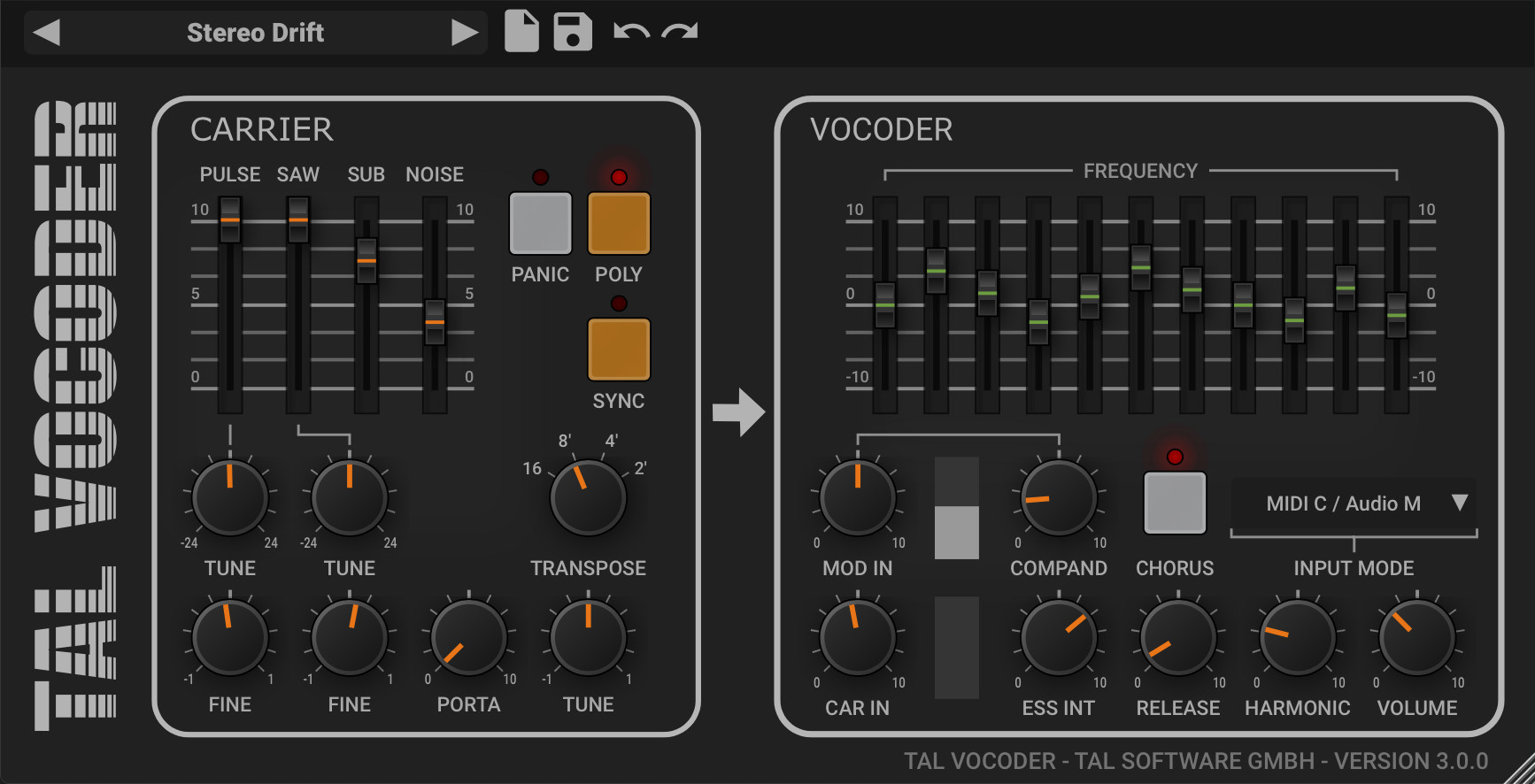
The TAL catalog and product routes were checked for the current version and free classification, but returned intermittent 404 responses during final live link validation. Stable official manual, image, and platform archive links are provided above. Plugin formats, operating system support, and routing menus can change after this source check date.
The host route can matter more than the preset. Follow this REAPER vocoder routing guide for detector, carrier, MIDI, and silence checks.