
Quick answer: To make vocals wider, keep the main lead centered, create width on a separate double layer, use small timing and pitch differences on opposite sides, filter that layer, and blend it quietly enough that the center never disappears.
If the extra layer needs a different character as well as width, use our pitch and formant processor comparison. It separates the available modes, current price, and licensing decision before you add the effect.
Disclosure: Rys Up Audio makes RysUpDoubler, which appears in this guide. The workflow also works with real double takes or any tool that gives you independent timing, pitch, pan, and level control.

Read start with a clean mono lead before choosing the next processing move.
How to make vocals wider while keeping the lead centered
A wide vocal is not a lead smeared across the entire stereo field. The center still carries the words, pitch, emotion, and impact. The sides create scale around it.
Start with the original lead in the center. Send it to a separate doubler or use dedicated double takes. Pan the support away from center, keep it lower than the lead, and remove any low or harsh buildup that competes with the original.
This separation solves the most common widening mistake. When the same processor changes the center and sides together, the vocal can sound bigger in stereo but smaller in mono. A protected center gives the mix somewhere stable to return when the speakers, phone, club, or streaming encode narrows the image.
Choose real doubles or a vocal doubler
Real double takes create the most natural width because timing, pitch, tone, and breath change on every phrase. Use them when the performance matters enough to record again and the singer can match the lead tightly.
A vocal doubler is faster. It works well when you only have one clean take, need instant width while writing, or want a controlled layer that can be automated around the hook. It also gives you repeatable settings across revisions.
The honest answer is not that one replaces the other. Use real doubles for a featured stack. Use a doubler for speed, reinforcement, and consistent width. You can also combine them: real takes outside, a quiet generated layer inside, and the lead protected in the middle.
Build the clean two voice starting point
Do not begin with maximum width and four loud voices. Start with two support voices so every move is audible.
- Pitch one voice slightly up and the other slightly down, around 6 to 10 cents.
- Delay each voice differently, around 15 to 25 ms.
- Pan them to opposite sides.
- Keep both voices well below the center lead.
- Use little or no feedback.
Small differences create separation. Identical copies only get louder. Extreme differences turn the double into a chorus, slap, or special effect. Build a stable pair first, then add more voices only when the hook still needs density.
Save this two voice setup before expanding it. That gives you a clean fallback when four voices become cloudy. Compare the pair and the full stack at the same output level. If the bigger version only sounds better because it is louder, lower the support and make the decision again. Width should change the shape of the vocal, not sneak extra level past your ears.
Use timing before extreme pitch
Timing is often the cleaner source of width. A short offset stops the left and right support from landing exactly with the dry lead. Pitch creates another separation cue, but too much detune can make the vocal sound seasick or obviously processed.
Move the delay times apart before pushing detune farther. Avoid giving both sides the exact same delay. One side might sit near 16 ms while the other sits near 23 ms. If you add a second pair, place it later and quieter so the layer feels like a stack instead of one duplicated event.
Check consonants. If every S, T, and K produces a fuzzy burst, reduce the level, shorten the number of active voices, or filter more top end from the support.
Pan around an empty center
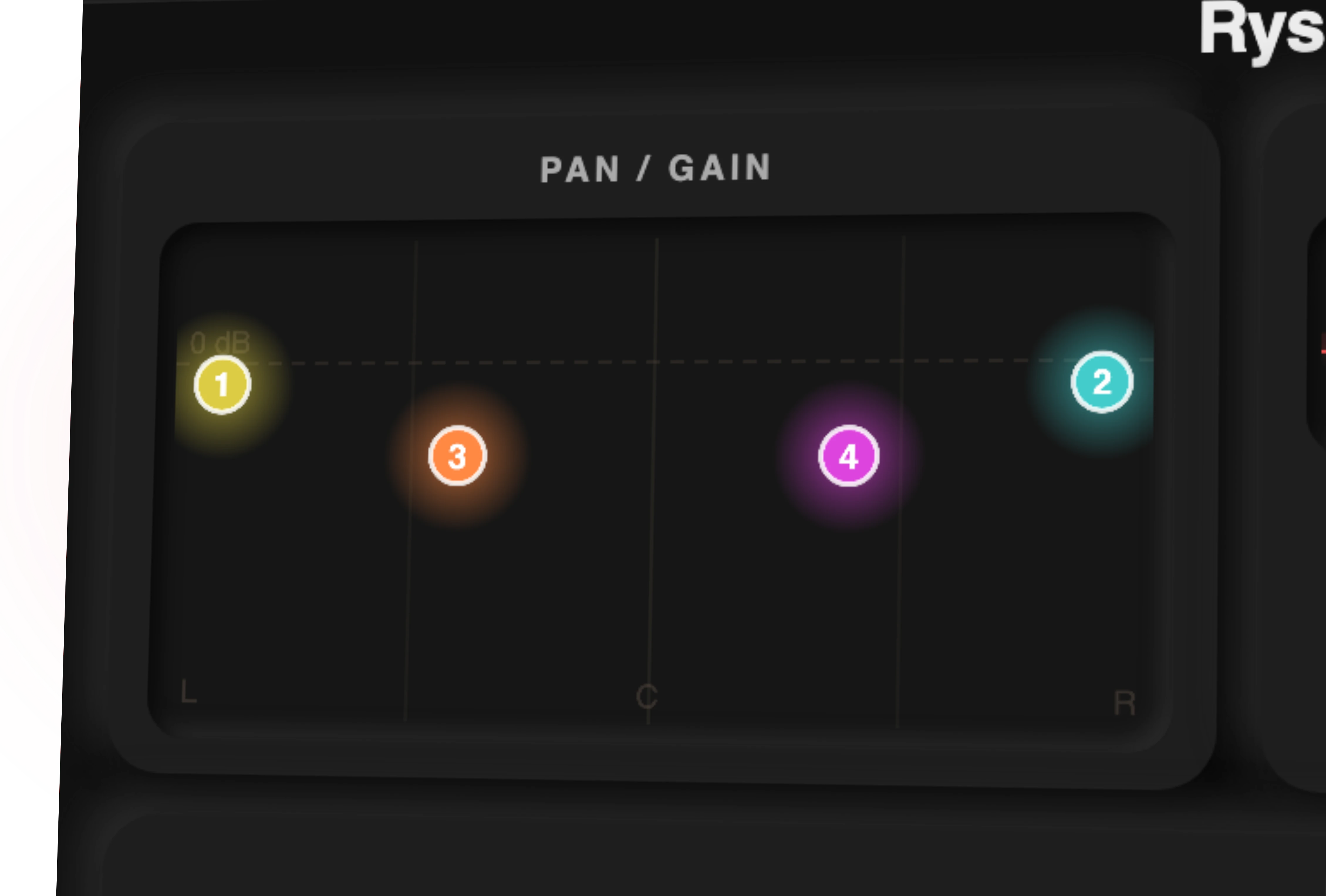
The lead owns the center. Put the first support pair outside it. A wide hook can use hard left and right voices. A more intimate verse may only need moderate panning.
quiet
quieter
center
quieter
quiet
If adding width makes the center feel hollow, the support is too loud, too correlated, or too aggressive. Pull the doubles down before adding another widener.
Blend the doubles underneath the lead
Bring the support layer down completely. Start the track, then raise it until the hook grows. Stop before the doubled words become a second lead.
A useful test is to mute the support. You should miss the size, not discover that the lyric suddenly became clearer. If clarity improves dramatically when muted, lower the layer or simplify it.
Automation beats one static mix. Use less width in the verse, more in the hook, and the widest setting on selected words or the final chorus. Contrast makes width feel bigger. If every section is fully spread, the listener stops perceiving the change.
Filter the support layer, not the lead
The doubles do not need the same low mids, breath detail, or brightness as the lead. Remove weight from the support until it stops crowding the center. Darken it when consonants become fizzy. Compress it only enough to keep the width stable under the performance.
This is why a separate return is useful. You can shape the doubled signal without hollowing out the original. RysUpDoubler includes a two band output EQ plus independent gain and pan for all four voices, so the support can be shaped inside the same window.
Do not high pass blindly. Listen for the point where the width loses body, then back down. The goal is a cleaner support layer, not a tiny telephone effect unless that is the creative choice.
Use these width settings by vocal job
| Vocal job | Voices | Timing | Pan | Blend |
|---|---|---|---|---|
| Verse lead | Two | 12 to 20 ms | Moderate L and R | Barely audible |
| Pop hook | Two to four | 15 to 30 ms | Wide outer pair | Under the lead |
| Rap doubles | Real pair or two generated | Tight | 20 to 60 percent | Phrase support |
| Ad libs | Two to four | 20 to 40 ms | Asymmetric | More obvious |
| Background stack | Real takes plus support | Natural variation | Layered across field | Behind lead |
The exact values are starting windows. Tighten timing when the words lose impact. Reduce voices when the stack turns cloudy. Widen the chorus because the arrangement asks for it, not because the control reaches farther.
Treat doubles, ad libs, and harmonies differently
A double reinforces the lead, so timing and wording need to stay tight. An ad lib can live farther from center with more delay and reverb because it is not carrying every lyric. A harmony needs enough separation that its new note reads without fighting the lead tone.
Do not send every layer through the same width setting. Keep doubles controlled, let ad libs move, and spread harmonies according to their musical role. This creates a vocal arrangement instead of one giant stereo blob.
When the hook still feels small, add a real performance layer before adding another processor. Different human takes create depth that a copied signal cannot fully recreate.
Run the mono and side balance tests
Collapse the mix to mono. The lead should stay strong and understandable. Some width can reduce when the sides combine, but the hook should not vanish or become hollow. If it does, lower the support, change the delays, or remove one highly correlated voice.
Then listen to only the sides if your meter or utility allows it. You should hear support and texture, not the full lead vocal. Too much intelligibility in the sides usually means the layer is too loud.
Finally, check one speaker at a time. The left and right support should feel balanced even when their delays and pitch offsets differ. Asymmetry creates life. A major level lean creates distraction.
Use RysUpDoubler for controlled width
RysUpDoubler gives you four independent voices with separate pitch, delay, modulation, pan, gain, and mute controls. It also includes output EQ, stereo width, wet and dry mix control, direct pan, and Vocal, Instrument, and Wide modes. Version 1.4.7 is the current signed Mac and Windows release through RysUpHub.
Start with the Vocal mode, mute extra voices until you understand the first pair, then build outward. Buy the plugin outright for $49.99, or choose RysUpSuite for the current paid catalog plus future paid releases under the current entitlement policy. You can compare the complete plugin lineup first.
Make the chorus bigger without blurring the song
Protect the center. Build small differences on the sides. Keep the support quieter than you think. Filter it. Automate it. Check mono. Those moves create width that survives real playback instead of disappearing outside your studio.
Use the vocal doubler buyer guide when you still need to choose a tool. Use the pop vocal mixing guide when you need to place doubles inside a complete chain. This page owns the actual vocal widening workflow.
Sources checked
- Current RysUpDoubler product, format, and control information, checked August 23, 2026
- Current signed RysUpDoubler release feed, checked August 23, 2026
- Puremix dry vocal width workflow, checked August 23, 2026
Need a plugin after building the width workflow? Use this focused two plugin decision for control, price, and licensing.
Once the sides feel wide enough, check how the full stack supports the lyric. This backing vocal group guide connects stereo choices with level, collective sibilance and depth.
Chorus can add moving width, but it is not the same as a recorded double. Use the chorus rate, depth and mix workflow when the job is modulation, then use the widening guide for the separate stereo placement decision.
Width and character are different decisions. Our formant shifting workflow shows how to color a background copy while keeping the main melody separate.
Want to see the width you are adding? RysUpImager puts four band width, rotation and a live vectorscope in one $9.99 plugin. Compare options in our stereo imager roundup.
Before committing the wider version, use this vectorscope and mono checking workflow to find the layer responsible for any loss of lyric clarity, body, or bass.