

Here's a question that haunts bedroom producers and home studio owners alike: why does a professional vocal chain cost more than your entire interface? Between pitch correction, EQ, compression, de-essing, and reverb, the "industry standard" plugins can easily run you $500 to $800. For a lot of independent artists, that's rent money.
For a rap performance, follow this hip hop vocal mixing workflow to check recording level, dynamics, and ambience before deciding which extra processor you need.
But here's the thing — the plugin landscape in 2026 looks nothing like it did five years ago. You don't need to mortgage your gear fund to get vocals that sound like they came out of a major label session. In this guide, I'm going to walk you through building a complete, professional vocal chain for under $100 using the RysUp plugin suite. We're talking pitch correction, surgical EQ, smooth compression, transparent de-essing, and lush reverb — everything you need, nothing you don't.
Let's break down exactly what goes into a pro vocal chain, what each plugin does, and why you don't need to spend $500+ to get there. (And if you want the fastest route, check out our vocal chain presets — instant pro sound in one click.)
What Actually Goes Into a Professional Vocal Chain?
At the final peak stage, decide between colored peak shaving and ceiling based limiting instead of treating both tools as interchangeable.
Before we start plugging things in, let's talk about what a vocal chain actually is and why the order matters. A vocal chain is the sequence of processing that takes a raw recorded vocal and turns it into something polished, balanced, and ready for a mix. Every major studio in the world uses some version of this signal flow:
- Pitch Correction — Tightening tuning without killing the performance
- EQ (Equalization) — Shaping the tone, cutting mud, adding presence
- Compression — Controlling dynamics so the vocal sits consistently in the mix
- De-essing — Taming harsh sibilance (those sharp "s" and "t" sounds)
- Reverb / Effects — Adding space, depth, and dimension
Skip any of these steps and you'll hear it. A vocal without pitch correction sounds pitchy. Without EQ, it sounds boxy. Without compression, it disappears behind the beat one second and blows your head off the next. Without de-essing, every sibilant cuts like a knife. And without reverb, the vocal sounds like it was recorded in a closet — which, let's be honest, it probably was.
The problem has never been knowledge. Producers know they need these five stages. The problem has always been cost.
The $500+ Problem: What a "Traditional" Vocal Chain Costs
Let's add up what the so-called industry standard vocal chain costs in 2026:
| Chain Step | "Industry Standard" Plugin | Price |
|---|---|---|
| Pitch Correction | Antares Auto-Tune Pro | $399 |
| EQ | FabFilter Pro-Q 3 | $179 |
| Compression | Waves CLA-76 | $49 |
| De-Esser | FabFilter Pro-DS | $129 |
| Reverb | Valhalla VintageVerb | $50 |
| Total | $806 | |
Over $800 just for vocal processing. And that's before you buy anything for your drums, bass, or mix bus. Some producers end up spending thousands on plugins before they've ever released a single track. It doesn't have to be this way.
The RysUp Vocal Chain: Pro Sound, Under $100
Here's the same chain, built with RysUp Audio plugins. Same five stages, same professional results, a fraction of the cost:
| Chain Step | RysUp Plugin | Individual Price |
|---|---|---|
| Pitch Correction | RysUpTune | $29.99 |
| EQ | RysUpEQ | $19.99 |
| Compression | RysUpComp | $19.99 |
| De-Esser | RysUpDS | $14.99 |
| Reverb | RysUpVerb | $19.99 |
| Total (Individual) | $104.95 | |
| Total (RysUpSuite Bundle) | $69.99 | |
That's right — the RysUpSuite bundle gets you the entire chain plus five more plugins for under $70. Compare that to $806 for the "traditional" route. You're saving over $700 while getting purpose-built tools that were designed specifically for vocal production.
Now let's walk through each step of the chain and how to set it up.
Step-by-Step: Building Your Vocal Chain
Step 1: Pitch Correction — RysUpTune

Pitch correction is always first in the chain. You want to fix tuning before you start shaping tone or controlling dynamics, because EQ and compression will amplify any pitch issues that are already there.
RysUpTune gives you real-time pitch correction with a simple, visual interface. Set your key and scale, adjust the retune speed to taste, and let it work. For a natural sound, keep the retune speed moderate — you want correction, not the robotic T-Pain effect (unless that's what you're going for, in which case crank it).
Quick settings for natural correction:
- Set the correct key and scale for your song
- Use a moderate retune speed for transparent correction
- Listen back and adjust — if you can hear the correction working, it's too aggressive
Quick settings for hard-tune / modern trap:
- Same key and scale setup
- Set retune speed to its fastest setting
- This gives you that snapped, chromatic feel that's all over modern hip-hop and pop
Step 2: EQ — RysUpEQ

EQ is where you shape the character of the vocal. A raw recording almost always has issues: low-end rumble from the room, muddy buildup in the low-mids, and not enough presence or "air" up top. RysUpEQ lets you fix all of that with surgical precision.
Essential vocal EQ moves:
- High-pass filter at 80-100 Hz — Cuts rumble, room noise, and plosives that made it past your pop filter. Every vocal needs this.
- Cut around 200-400 Hz — This is where mud and boxiness live. A 2-3 dB cut here cleans things up dramatically.
- Boost around 3-5 kHz — This is the presence range. A gentle boost here helps the vocal cut through the mix without turning up the volume.
- Shelf boost above 10 kHz — Adds "air" and shimmer. This is the difference between a vocal that sounds recorded and one that sounds produced.
Start subtle. You can always add more. The best EQ moves are the ones nobody notices — they just make the vocal sound right.
Step 3: Compression — RysUpComp
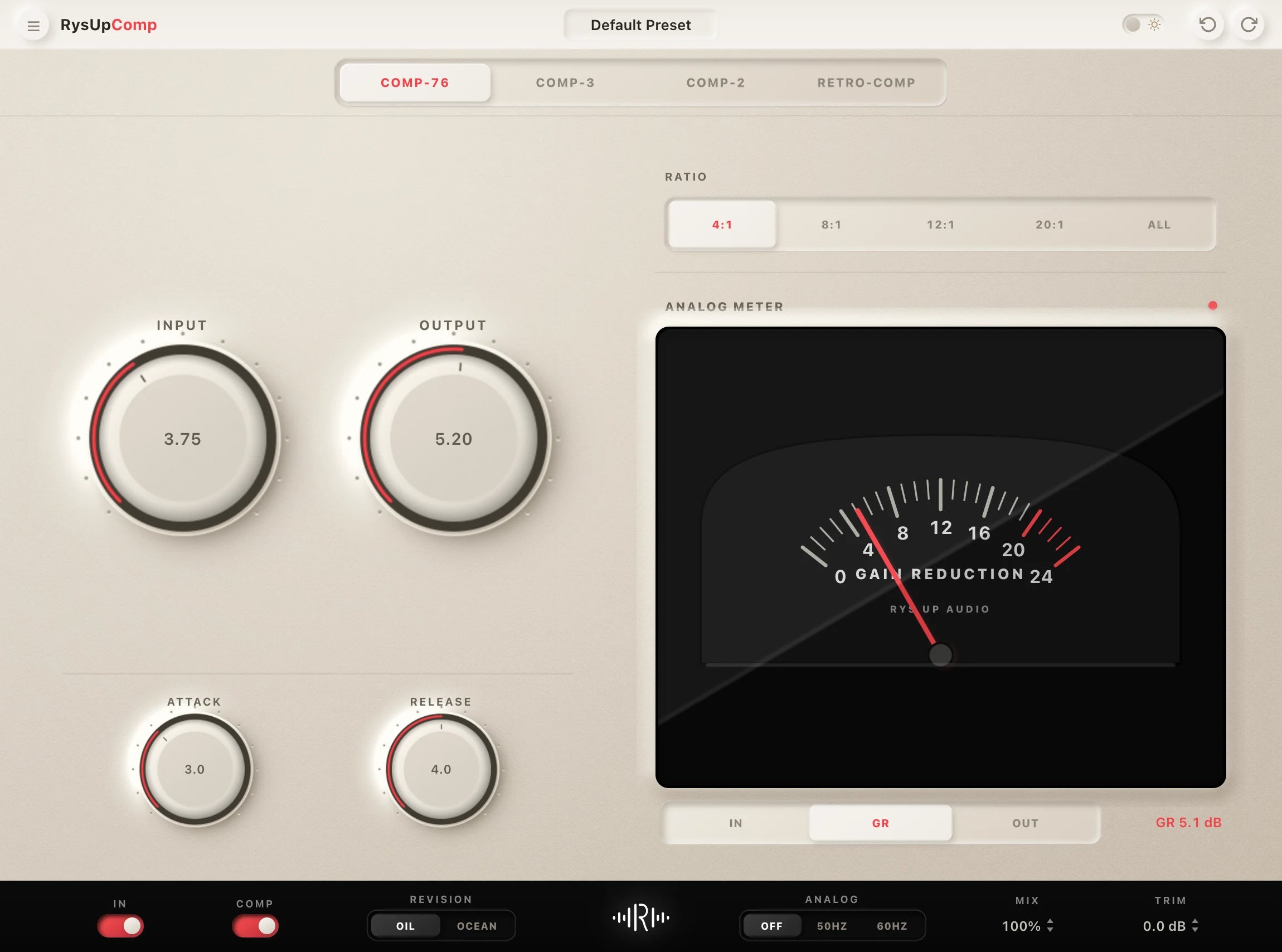
Compression is what makes a vocal sit properly in a mix. Without it, quiet words disappear behind the beat and loud phrases jump out and hit the listener in the face. RysUpComp evens out those dynamics so every word is audible and controlled.
Starting point for vocal compression:
- Ratio: 3:1 to 4:1 — This is the sweet spot for vocals. Enough control without squashing the life out of the performance.
- Attack: Medium (10-30ms) — Let the transients through so the vocal still sounds natural and punchy.
- Release: Medium-fast — Fast enough to recover between phrases, slow enough to avoid pumping artifacts.
- Threshold — Set it so you're getting 3-6 dB of gain reduction on the loudest parts. If the gain reduction meter is constantly pinned, you're compressing too hard.
- Makeup gain — Bring the level back up to match your bypass level. Compression reduces volume, so you need to compensate.
The key to good vocal compression is subtlety. You should feel the compression making the vocal more consistent, not hear it squashing the dynamics.
Step 4: De-Essing — RysUpDS

Here's the thing about sibilance: it gets worse with every processing step. The EQ boost at 3-5 kHz that gives your vocal presence? It also makes "s" and "t" sounds sharper. The compression that controls your dynamics? It brings up quiet sibilance that was hiding in the background. By the time you've done steps 1-3, your sibilance is louder and harsher than it was in the raw recording.
That's why the de-esser goes after EQ and compression, not before. RysUpDS catches those amplified sibilant frequencies and pulls them back down to a natural level.
Setting up your de-esser:
- Frequency range: 5-8 kHz — This is where most sibilance lives. Solo the detection band to hear exactly where the harshness is in your specific vocal.
- Threshold — Set it so the de-esser only activates on actual sibilant sounds, not on every word. Watch the gain reduction — it should grab 3-6 dB on harsh "s" sounds and stay quiet the rest of the time.
- Listen critically — If every word sounds like the singer has a lisp, the threshold is too low or the range is too wide. Back it off until it sounds natural.
Step 5: Reverb — RysUpVerb

Reverb is the final touch — it takes a dry, "in your face" vocal and places it in a space. The right reverb makes a vocal sound expensive. The wrong reverb makes it sound like a cave. RysUpVerb gives you musical, natural-sounding reverb algorithms that work across genres.
Reverb settings by genre:
- Hip-Hop / Trap: Short plate reverb, low mix (15-25%). You want a sense of space without washing out the vocal. The vocal should still sound upfront and aggressive.
- R&B / Pop: Medium plate or hall, moderate mix (20-35%). A little more lushness to complement smoother vocal styles.
- Indie / Alternative: Longer hall or room reverb, mix to taste. Indie vocals often sit further back in the mix, so you can afford to be more generous.
- Ballads: Long hall reverb, higher mix (30-45%). Big, emotional, cinematic. Let the reverb tail breathe.
Pro tip: Use RysUpVerb on a send/aux track rather than directly on the vocal channel. This lets you blend the reverb level independently and keeps your dry vocal intact. It also means you can EQ the reverb return separately — cutting low-end from your reverb is one of the easiest ways to keep a mix clean.
The Complete Chain: Putting It All Together
Here's your finished signal flow, top to bottom:
- RysUpTune — Fix the pitch first, before anything else touches the signal
- RysUpEQ — Shape the tone: cut the mud, boost the presence, add the air
- RysUpComp — Control the dynamics so every word sits right in the mix
- RysUpDS — Clean up the sibilance that EQ and compression made worse
- RysUpVerb — Add space, depth, and dimension (on a send track)

This chain works in any DAW — FL Studio, Ableton, Pro Tools, Logic, GarageBand, Studio One, Cubase, Reaper. All RysUp plugins are available as VST3 and AU formats. Just head to the Installer Hub to download and install.
Side-by-Side: Traditional Chain vs. RysUp Chain
| Feature | Traditional ($806) | RysUp ($69.99 bundle) |
|---|---|---|
| Pitch Correction | Antares Auto-Tune Pro | RysUpTune |
| EQ | FabFilter Pro-Q 3 | RysUpEQ |
| Compression | Waves CLA-76 | RysUpComp |
| De-Esser | FabFilter Pro-DS | RysUpDS |
| Reverb | Valhalla VintageVerb | RysUpVerb |
| Additional Plugins | None | 5 more included in bundle |
| Total Cost | $806+ | $69.99 |
| Savings | — | $736+ |
| DAW Compatibility | Varies by plugin | All major DAWs (VST3/AU) |
| Subscription Required? | Some (Antares) | No — one-time purchase |
The math speaks for itself. And keep in mind — the RysUpSuite bundle doesn't just give you the five vocal chain plugins. You also get RysUpAir (high-frequency enhancer), RysUpDelay (stereo delay), RysUpNoise (noise gate), RysUpMultiBand (multiband compressor), and RysUpShift (pitch shifter). That's 10 plugins total for the price of one "industry standard" de-esser.
Tips for Getting the Most Out of Your Chain
Having the right plugins is half the battle. Here's how to get the most out of them:
1. Record the Best Signal You Can
No plugin chain can fix a bad recording. Get your mic placement right, use a pop filter, treat your room (even if that means hanging blankets on the walls), and record at a healthy level without clipping. The cleaner your input signal, the less work your chain has to do — and the better it will sound.
2. Gain Stage Between Plugins
Every plugin in your chain should receive a signal at a reasonable level. If RysUpTune is outputting a signal that's too hot, RysUpEQ will clip. If RysUpComp is bringing the level way down, RysUpDS won't have enough signal to work with. Watch your levels between each stage.
3. Use Your Ears, Not Your Eyes
It's tempting to stare at the frequency analyzer in RysUpEQ or the gain reduction meter in RysUpComp. Those are useful tools, but your ears are the final judge. Close your eyes, listen, and ask: does this sound better? If you can't hear a difference, you probably don't need that move.
4. A/B Everything
Bypass each plugin frequently to compare the processed and unprocessed sound. It's easy to keep adding "improvements" until you've completely mangled the vocal. Regular A/B testing keeps you honest and prevents over-processing.
5. Less Is More
The best vocal chains are the ones where each plugin is doing a small, specific job well. If your EQ is making 8 dB cuts and boosts, something went wrong earlier in the process (probably the recording). Aim for gentle, tasteful moves at each stage.
Who Is This Chain For?
If your rap session needs a saved starting chain rather than another individual plugin, compare the Hip Hop and Rap vocal presets. Keep the DAW and required effects fixed while auditioning different directions, and match the processed level before judging the tone. The chain remains editable for the actual voice and beat.
This vocal chain setup works for anyone who records and mixes vocals:
- Bedroom producers who want pro-sounding vocals without pro-level prices
- Independent artists who mix their own music and need reliable, easy-to-use tools
- Home studio engineers who are building their plugin collection strategically
- Content creators who need clean, polished vocal audio for podcasts, YouTube, or streaming
- Students learning audio production who need affordable, professional-grade tools to practice with
Whether you're recording rap vocals, singing R&B hooks, tracking indie rock, or voicing over a YouTube video, this chain covers the fundamentals. And because all the plugins are lightweight and CPU-efficient, you can run the full chain on a laptop without your DAW choking.
For a rock session, compare the Punk and Rock vocal preset collection before copying a rap or pop chain. Start with the version for your DAW, then adjust the saturation and ambience against your dry take.
Getting Started
Ready to build your chain? Here's how to get up and running in minutes:
- Grab the bundle: Pick up the RysUpSuite bundle for $69.99 (all 10 plugins included), or purchase each plugin individually from the Rys Up Audio store.
- Download and install: Head to the Installer Hub to download the installers for your platform (Mac or Windows).
- Load them in order: Open your DAW, create a vocal track, and load the five plugins in order: RysUpTune → RysUpEQ → RysUpComp → RysUpDS → RysUpVerb (on a send).
- Start with the settings above: Use the starting points from each section of this guide, then adjust to taste for your specific vocal and mix.
You don't need to spend $800 to sound professional. You need the right tools, the right order, and the right technique. The RysUpSuite gives you the tools. This guide gives you the order and technique. The rest is up to you.
Questions about setting up your chain or choosing the right plugins? Get in touch with us here — we're happy to help.
Pair Your Vocals With RysUp Plugins
If you want to upgrade your vocal chain, every plugin in the RysUp collection is built specifically for vocal production — modern codebase, weekly updates, no iLok, and a fraction of the cost of legacy software.


Frequently Asked Questions
Do I need all five plugins, or can I start with fewer?
You can absolutely start with fewer. If you had to pick three, go with RysUpEQ, RysUpComp, and RysUpDS — those are the core of any vocal chain. Add RysUpTune if you need pitch correction and RysUpVerb when you're ready for reverb. That said, the RysUpSuite bundle is the best value since you get all 10 plugins for less than the cost of buying three individually.
Does the order of the plugins matter?
Yes, signal chain order matters a lot. Pitch correction should always come first (before EQ and compression alter the signal). EQ before compression gives you a cleaner signal going into the compressor. The de-esser goes after compression because compression tends to amplify sibilance. And reverb is always last — you want to add space to the fully processed vocal, not process a reverb-soaked signal.
Will these plugins work in my DAW?
RysUp Audio plugins are available as VST3 and AU formats, which means they work in all major DAWs including FL Studio, Ableton Live, Pro Tools, Logic Pro, GarageBand, Studio One, Cubase, and Reaper. Both Mac and Windows are supported. Download them from the Installer Hub.
Can I use this chain for genres other than hip-hop?
Absolutely. This five-stage vocal chain (pitch correction, EQ, compression, de-essing, reverb) is the standard workflow used in every genre — pop, R&B, rock, indie, country, electronic, you name it. The specific settings will change based on the genre and the vocalist, but the structure is universal. The genre-specific reverb settings in this guide are a good starting point.
What if I already own some of these plugins from other companies?
You can mix and match. There's nothing stopping you from using RysUpTune for pitch correction and a different EQ you already own. That said, the RysUp plugins are designed to work well together and share a consistent interface, so using the full suite keeps your workflow fast and predictable. And at $69.99 for the bundle, it might be worth consolidating anyway.
Choose the right tool before you buy
Ready to compare the actual options? Use our compare vocal compressors and compare vocal EQ plugins to match the plugin to the job, budget, and workflow.
Building the chain in Studio One
Compare complete Studio One starting points
Use the budget guide to choose individual processors. The Studio One vocal preset collection gives you complete editable chains for leads, hooks, doubles, and background vocals inside Studio One.
Ready to set the space in this chain? Use the vocal reverb starting points for predelay, decay, tone, and return level.
Supporting layers need a different job from the lead. Use this ad lib mixing workflow to set level, width, delay, and reverb without crowding the center.
A budget is useful only after the jobs are clear. Compare the best vocal chain plugin categories before deciding what to buy alone or access through Suite.
Finish the chain with a defined safety job. This vocal limiter guide shows when one or two dB of peak control is enough and when the source still needs repair.
A budget chain assumes you already have somewhere to record and load it. This vocal software buying guide separates host costs, processor access and preset dependencies so the cheapest product card does not hide the complete setup cost.