
The best vocal rider plugin is the one that keeps the singer present without turning the session into an afternoon of clip gain edits. For most modern vocal sessions, RysUpRider is our pick because the target, range, reaction, and actual ride history all stay visible in one focused window.
The short answer: choose RysUpRider when you want fast automatic vocal leveling, a clear visual history, and direct control over how the ride reacts to the singer and the music. It is $9.99 a month with the annual RysUpSuite plan, or $24.99 to own.
Disclosure: Rys Up Audio makes RysUpRider. We checked every competitor fact and price against official product pages on July 25, 2026. This comparison says where another tool wins because the right plugin depends on the job.
The best vocal rider plugins in 20 seconds

Best focused visual workflow: RysUpRider
Set a target and asymmetric range, choose how quickly the gain can move, then watch the vocal level and generated ride together. Best for producers who want the leveling decision to stay obvious.
Best mature automation workflow: Waves Vocal Rider
Its official page supports real time riding, music awareness, and writing the result to an automation track. The current checked sale is $34.99, down from a listed $199.
Closest visual alternative: Nuro Audio Xrider
Target, separate minimum and maximum ranges, Speed, waveform history, and gain history make Xrider the closest direct workflow match. Official price: $59.99.
Best detailed loudness tool: GainRider3
Choose it for EBU R128 measurement, pre delay, ducking, sidechain operation, and read or write automation. Official price: €59.
Best value for deep routing: HoRNet AutoGain Pro MK2
Dual detectors, stereo or mid side processing, internal or external sources, and automation writing at an official €26.99 make it hard to ignore.
Why use a vocal rider before a compressor
A compressor reacts to dynamics above a threshold. A vocal rider follows the overall level and moves gain up or down around a target. Those jobs overlap, but they are not the same.
A rider and a compressor do different jobs. Once phrase level is steadier, try light gain reduction with RysUpComp to shape the remaining peaks. Match the output level before you decide whether the compression helps.
Put the rider before the compressor and the compressor receives a steadier performance. Quiet words arrive closer to the working level. Loud phrases need less corrective reduction. The compressor can spend more of its range shaping tone, density, and energy instead of rescuing every line.
This does not mean the rider should flatten the singer. The goal is to reduce distracting jumps while keeping the performance alive. A narrow range and slower reaction can make subtle moves. A wider range and faster reaction can handle a rough demo or a singer who moved around the microphone.
Why RysUpRider wins for fast vocal leveling
The target and range are the first decision
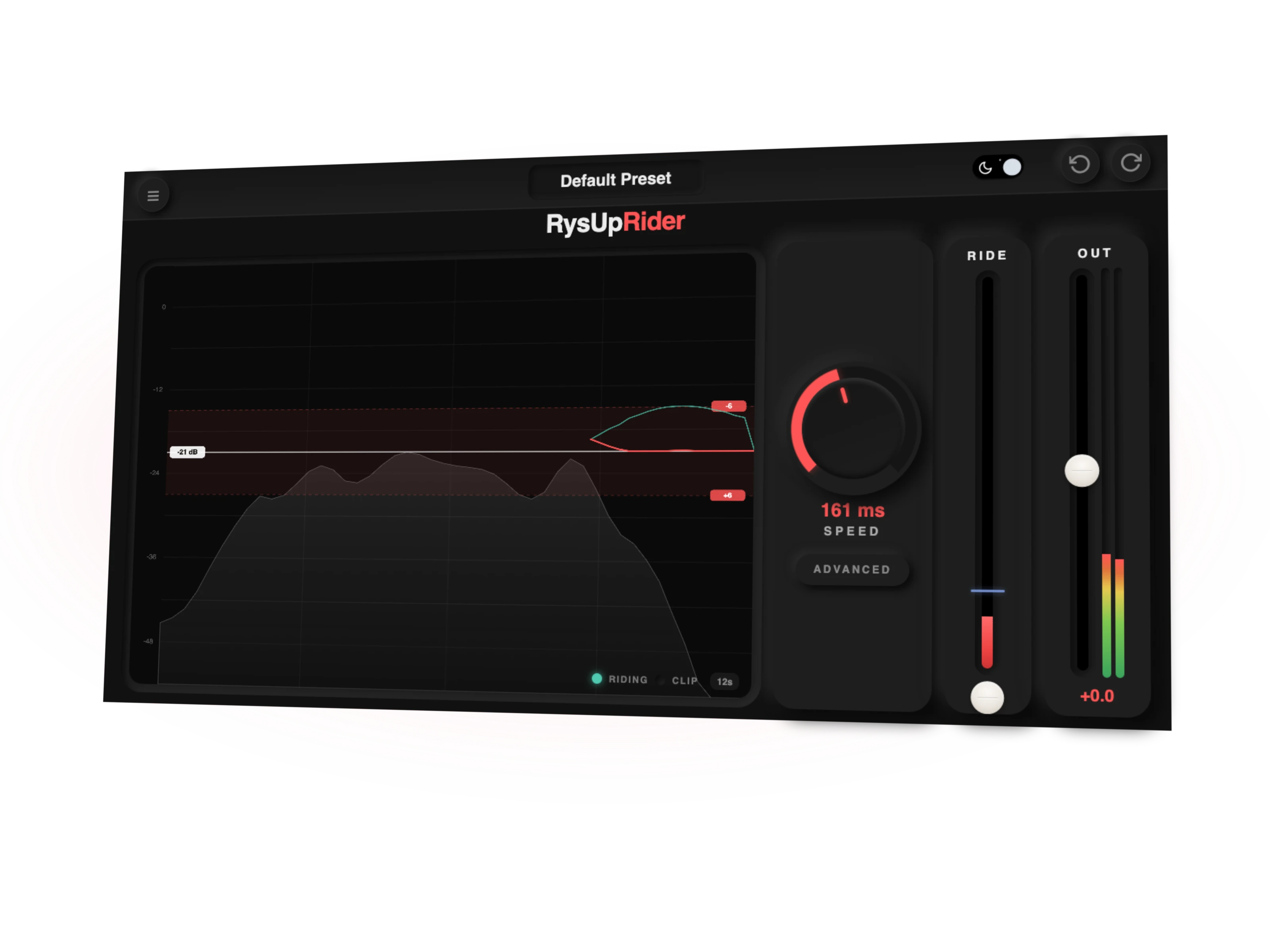
RysUpRider starts with one question: where should this vocal sit? Set the target, then decide how far the plugin may turn the vocal down and how far it may lift it. The upper and lower limits are independent, so a loud singer can receive more downward control without allowing quiet breaths to jump forward by the same amount.
Speed controls how quickly the ride can travel. Vocal Sensitivity changes how strongly the detector follows the singer. RMS and peak modes let you decide whether the rider should follow average energy or respond more closely to transient level.
The history shows the decision
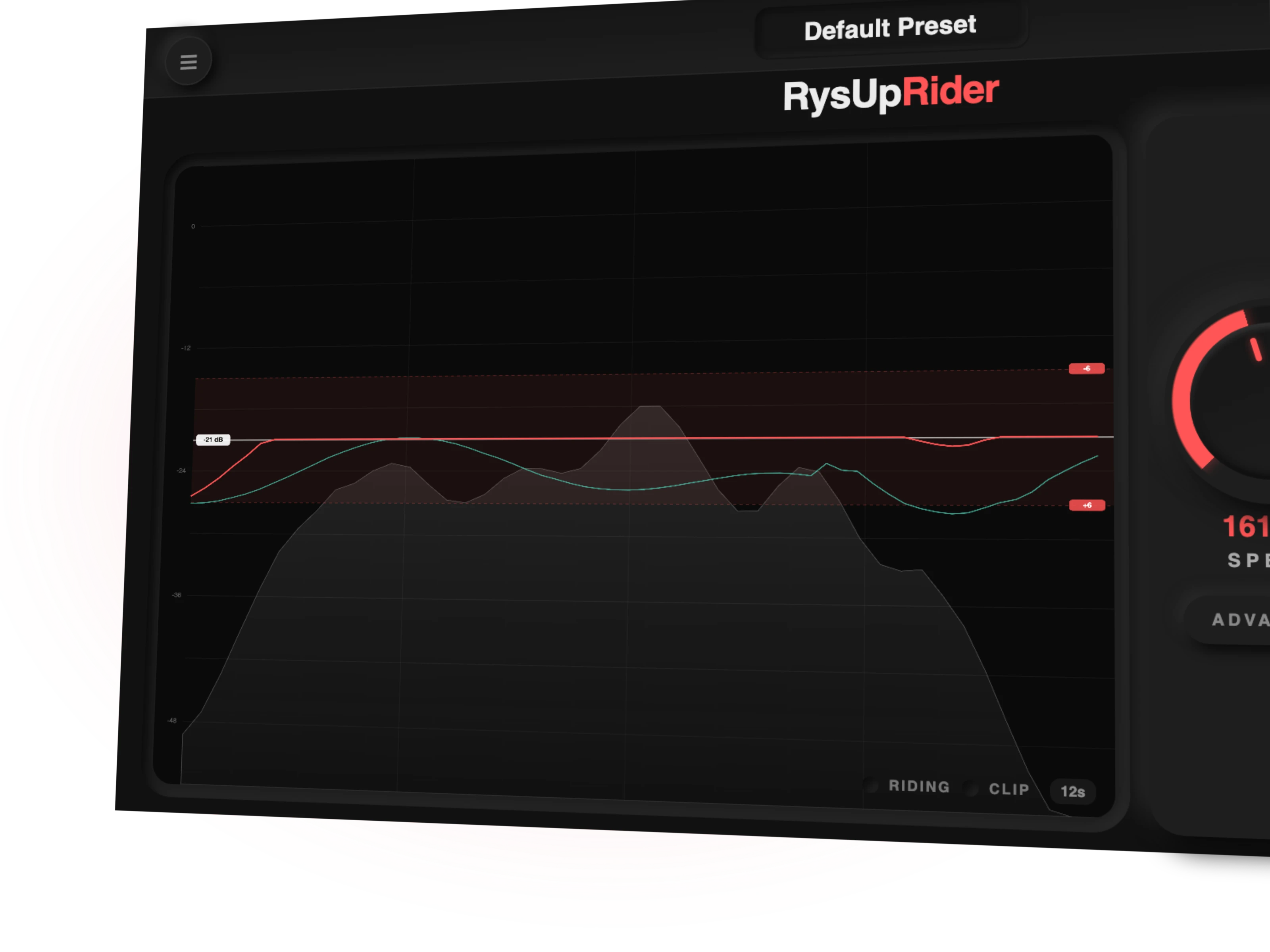
A level meter tells you what is happening right now. A history display tells you why the last phrase felt different. RysUpRider plots the vocal level, the target window, and the generated gain move together.
That view makes setup faster. If the ride keeps reaching the upper limit, the target may be too high or the source may need more clip gain first. If the line moves constantly around breaths and headphone spill, Spill, Idle, Park, and sensitivity can calm the detector.
The music sidechain gives the vocal context
A vocal can look consistent alone and still disappear when the beat opens up. Route the instrumental or music bus into the sidechain, enable Music Sidechain, and RysUpRider can judge the singer against the surrounding track.
Music Sensitivity controls how much that context matters. Use a subtle setting when the instrumental only needs to nudge the decision. Push it further when dense choruses need a stronger vocal lift than sparse verses.
Park and Spill stop the wrong moves
Every automatic rider needs a plan for the moments between words. Spill helps reject low level room noise, headphone bleed, and background information. Idle defines how the rider behaves when the vocal is not confidently present. Park lets the gain return to a stable resting position instead of wandering through silence.
These controls matter more than a giant preset menu. RysUpRider version 1.0.0 does not include factory presets, so the interface is built to make manual setup fast and repeatable.
Where the other vocal rider plugins win
Waves Vocal Rider
Waves Vocal Rider remains the familiar studio standard. The official product page supports real time zero latency riding, a music input, Spill control, a 12 dB up or down range, and writing the gain movement to a DAW automation track.
That last feature is the major difference. RysUpRider displays and applies its ride in real time, but version 1.0.0 does not write the generated movement into an editable DAW automation lane. If an editor must redraw every move after the pass, Waves is the better fit.
The checked Waves sale is $34.99, but the official page also lists a $199 regular price. Sales change. Compare the current price when you buy, not the screenshot you saw last month.
Read the focused RysUpRider and Waves Vocal Rider comparison for the direct buying decision.
Nuro Audio Xrider
Xrider is the closest visual alternative. It has a target, independent minimum and maximum ranges, adjustable Speed, a real time waveform, TrueGain history, presets, and a free trial. The official price is $59.99 and Nuro states that the license includes lifetime updates.
Choose RysUpRider if you prefer its music sidechain, Spill, Idle, Park, RMS or peak detector choice, and Suite access.
TBProAudio GainRider3 and DynaRide2
GainRider3 is the deeper loudness specialist. It offers three ride modes, EBU R128 measurement, flexible pre delay, filtering, ducking, sidechain operation, and automation output. The official price is €59.
DynaRide2 costs €39 and covers vocal, speech, dialogue, and bass with source specific detector programs. It also supports sidechain operation and read or write automation. Choose it when the work extends beyond vocal production or dialogue needs a dedicated mode.
HoRNet AutoGain Pro MK2
HoRNet offers serious routing depth for €26.99. Two detectors and processors, internal or external sources, peak or RMS behavior, stereo and mid side modes, filters, up to 36 dB of range, and automation writing make it the most flexible low cost option here.
RysUpRider is easier to read at a glance and is designed around a vocal first history workflow. HoRNet wins when dual path routing, mid side processing, or automation writing matters more than the focused interface.
Vocal rider plugin comparison
| Plugin | Checked price | Best use | Automation write | Main catch |
|---|---|---|---|---|
| RysUpRider | $9.99 with Suite or $24.99 owned | Focused visual vocal leveling | No | No factory presets in version 1.0.0 |
| Waves Vocal Rider | $34.99 checked sale, $199 listed regular | Mature editable ride workflow | Yes | Sale price can change |
| Nuro Audio Xrider | $59.99 | Visual target and range workflow with presets | Not claimed on the checked page | Costs more than RysUpRider owned |
| GainRider3 | €59 | EBU loudness, pre delay, ducking, and detailed control | Yes | More setup than a focused ride may need |
| DynaRide2 | €39 | Vocal, speech, dialogue, and bass | Yes | Broader utility workflow rather than a vocal first history view |
| HoRNet AutoGain Pro MK2 | €26.99 | Dual detector and mid side routing | Yes | Denser interface and setup |
How to test a vocal rider fairly
- Use the same raw vocal. Pick a verse with whispers, normal phrases, and one loud line.
- Bypass the compressor. Judge the ride before another processor hides the gain movement.
- Match the range. Give every plugin the same maximum lift and cut before comparing behavior.
- Level match the output. Louder almost always feels better for the first few seconds.
- Listen between words. Breaths, room noise, and headphone spill reveal weak detector behavior quickly.
- Try the music sidechain. A rider that works solo may make different decisions inside a dense chorus.
- Check the edit workflow. If you need written automation, verify that feature before buying.
After the rider feels natural, bring the compressor back. Start with less gain reduction than usual and listen for a steadier, less pinched vocal. For more chain help, read our vocal chain order guide and explore the vocal mixing plugin collection.
Keep every word in the pocket
RysUpRider gives you automatic vocal leveling, a live ride history, independent range limits, music sidechain awareness, and detailed detector control in one focused window.
Get the full Suite for $9.99 a monthOwn RysUpRider for $24.99
Want to compare the whole catalog first? Explore the plugin lineup or open the RysUpHub installer page.
Sources checked July 25, 2026
- RysUpRider shipping source, release candidate, and product page
- Waves Vocal Rider official product page
- Nuro Audio Xrider official product page
- TBProAudio GainRider3 official product page
- TBProAudio DynaRide2 official product page
- HoRNet AutoGain Pro MK2 official product page
Prices, sales, formats, and compatibility can change after the source check date. Confirm the current official page before buying.
Ready to use the rider in a real chain? Follow the clip gain and vocal riding workflow to feed the compressor a steadier performance.
Put that level ride inside a complete vocal preset chain when you want the rider, EQ, compression, de essing, and space to work as one starting point.
The bottom line
Every plugin on this page does the job. Only one of them is RysUpRider — one price, paid once, no subscription and no dongle.
If your current tool combines riding with breath and pause editing, compare the full preparation job. This vocal preparation replacement guide separates live gain control from editable regions and checks existing upgrade entitlements.