

RysUpGas. One Character knob, five modes.

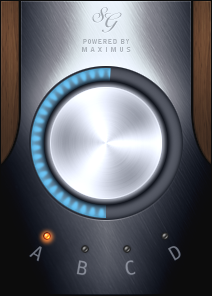
Image-Line Soundgoodizer. Official interface.
RysUpGas is a $9.99 Soundgoodizer alternative for producers who want a simple character insert. One knob, five modes and 30 presets. It takes the fast workflow in its own direction instead of promising identical sound.
Disclosure: We make RysUpGas. This is our product comparison, based on the official product information linked below. It is not an independent review or a claim that the plugins produce identical audio.
Why this workflow works
You know the problem. A part is technically fine, but it feels too small next to the rest of the track. Building a fresh chain of compression, color and tone shaping can take longer than the decision deserves.
Soundgoodizer made the simple answer familiar: choose a program, turn the big knob, listen. Gas keeps that short interaction and gives you five different characters. You are making an audible choice instead of spending the first minute naming your compressor settings.
The shortcut is useful because it reduces setup. It does not remove the need to hear what changed. A small amount can make a part easier to place. Too much can push background detail or distortion forward.
What Soundgoodizer is
Image-Line’s official manual describes Soundgoodizer as a stereo maximizer and enhancer built on the Maximus engine. Its four A, B, C and D choices come from Maximus presets. The amount knob blends the input with the low, mid and high compressor outputs.
Soundgoodizer is included in all FL Studio editions according to the current edition comparison. We do not assign a separate standalone price to it or treat the price of the entire DAW as its plugin price. Those details explain why a single control can do more than turn the volume up. It is bringing a prepared processing path into the signal. If you want to understand the original settings, the manual points to the corresponding Maximus presets.
Gas has its own voices numbered 1 through 5, combining multiband compression, saturation and presence. Numbered modes are not a relabeling promise. We do not claim that 1 equals A, or that you can move a Soundgoodizer amount value into Gas and get the same output.
| Decision | Competitor | RysUpGas |
|---|---|---|
| Processing idea | Maximus based stereo maximizer and enhancer | Multiband compression, saturation and presence |
| Modes | Four programs A to D | Five characters 1 to 5 |
| Main control | Input and compressor output blend | Character amount |
| Starting settings | Four selected Maximus programs | 30 factory presets |
| Identical sound promised | Not applicable | No; Gas has its own voices |
The Gas decision
Gas is $9.99 for a standalone perpetual license. Its interface uses one animated Character knob with the five choices below it. Thirty factory presets give you repeatable starting settings when you do not want to audition from zero.
The hamburger menu has Copy and Paste for moving settings between Gas instances. Try a setting on your lead, copy it to the double, then adjust the second track against the vocal stack. Related settings can help you work quickly without forcing every part into the same tone.
Gas is also included with RysUpSuite. Active subscriptions include the current paid lineup and future paid releases while the plan is active. Gas 1.0 ships macOS Audio Unit, VST3 and AAX plus Windows VST3 and AAX. Check the live product requirements and Hub downloads for your DAW and operating system.
Outside the original session
The important question for a Soundgoodizer alternative is often workflow: can you carry the idea into the host where you are actually mixing? A new processor can offer the fast control pattern while making different tonal decisions.
If you are moving a song between DAWs, export a dry version and a reference version of the part. A reference tells you what you were trying to achieve. The dry export gives you something you can still adjust. Do not bake every effect into the only copy of a take.
Load Gas on the dry part, match the reference level, then audition its five characters. Aim for the role in the arrangement. Do not assume a similar looking control will recreate the original session exactly.
Check automation when exchanging sessions. A saved knob curve belongs to the processor and parameter that created it. Rebuild the musical intention in the new insert rather than copying numeric values without listening.
A fair vocal audition
Begin with a short loop that includes a loud syllable, a quiet ending and a breath. Fix severe clip gain jumps before adding character. Put Gas after necessary cleanup, start with a low Character amount and listen with the beat playing.
Change the mode before making large amount changes. One voice may bring the part forward at a lower setting. Another may create an edge that is useful for an ad lib but too much for the lead.
Use a separate output trim after the plugin to make the processed and bypassed versions similar in loudness. Bypass the plugin and its compensation trim together. Compare intelligibility, consonants and the sustained tone rather than simply choosing the louder version.
Then listen at a lower monitor level. If the lyric stays understandable without an exaggerated edge, you are closer to the actual job. If breaths and sibilants dominate, reduce the amount or fix those issues with the right cleanup tool.
A fair drum and bass audition
On drums, the first transient and the body need separate attention. Raise Character slowly while listening to the kick attack and snare decay. More density can sound exciting but reduce the contrast that makes a rhythm move.
On bass, compare the fundamental against the kick and the upper detail against the rest of the instruments. A brighter bass is not automatically a clearer mix. Match levels and check mono before calling the change finished.
If the part already carries heavy clipping or compression, begin with a very small amount. There is no rule that every insert needs another stage of density. The right setting may be less than you expected.
These steps are an audition method, not a published claim that Gas beats Soundgoodizer on every signal. We are not claiming matched harmonics, identical output or universal sonic superiority.
A small insert with useful choices
Gas makes the simple workflow affordable: $9.99, five characters, one animated knob and 30 presets. You can hear a different direction quickly, save the setting and keep moving.
For other processors in this space, read our compression and saturation comparison and one knob loudness comparison. The vocal compression guide covers the dynamics setup before adding character.
Explore RysUpSuite Own RysUpGas for $9.99
Gas is included with RysUpSuite. Active subscriptions include the current paid lineup and future paid releases while the subscription stays active. The separate $9.99 Gas purchase is a perpetual license.
Compare the complete vocal chain plugin category when this insert is one part of a larger setup.
Explore the plugin lineup, install through RysUpHub, and get help through our contact page.
Sources and price check
Image-Line Soundgoodizer manual and FL Studio edition comparison. Gas features and price were checked against the launch source and Shopify product record.
Prices and official feature information checked October 6, 2026. Sale prices can change. This comparison does not include a listening test of the competing plugin.