
Use this vocal compression cheat sheet as a starting point, then set threshold from the actual performance. Start near 3:1, use 15 to 30 ms of attack, set release so gain reduction recovers before the next phrase, and aim for 2 to 5 dB of reduction on the loud words. Match the output level before deciding whether the vocal improved.
Disclosure: Rys Up Audio makes RysUpComp. The settings below are practical starting points, not universal rules. Product details and official compressor documentation were checked August 30, 2026.
The fast answer: control the input first, choose a ratio, lower threshold until the loud phrases move the meter, tune attack for articulation, tune release for phrase recovery, then match the bypass level. If the compressor is reacting differently to every line, level the vocal before compression instead of crushing the loudest phrase.
Compression handles performance movement, while this soft clipper versus limiter guide handles the separate peak shaping decision.
Vocal compression cheat sheet
| Vocal job | Ratio | Attack | Release | Gain reduction |
|---|---|---|---|---|
| Natural lead control | 2:1 to 3:1 | 20 to 35 ms | 60 to 120 ms | 2 to 4 dB |
| Upfront rap or pop lead | 3:1 to 4:1 | 10 to 25 ms | 40 to 90 ms | 3 to 6 dB |
| Spiky consonants | 4:1 to 6:1 | 1 to 10 ms | 30 to 70 ms | Peak control only |
| Background stack | 4:1 to 6:1 | 5 to 20 ms | 40 to 100 ms | 4 to 8 dB |
| Parallel density bus | 8:1 or higher | Fast | Medium fast | Heavy, then blend low |
These numbers are a launch point. The recording level, singer, microphone distance, tempo, compressor design, and arrangement decide the final settings. Start with the row that matches the job, then move one control at a time.
Natural lead vocal
Use the gentler row when the singer is already controlled and you only need the loud words to stop leaning out of the mix. Keep the attack slow enough to preserve articulation. If the vocal starts feeling smaller, reduce the amount of gain reduction before changing every other control.
Upfront rap or pop lead
Use firmer control when the vocal must stay locked against a dense beat. A 3:1 or 4:1 ratio is enough for many performances. Do not assume a harder ratio automatically creates more presence. Presence comes from the complete balance of level, articulation, tone, and space.
Background vocal stack
Background layers can usually take more reduction because their job is consistency behind the lead. Compress each layer only as much as needed, then judge the complete stack in mono and stereo. Heavy reduction on every layer can build breath noise and make the stack feel cloudy.
Parallel density bus
The parallel row is intentionally extreme because the bus is blended under the main vocal. Keep the dry lead as the articulation anchor. If you can clearly hear the parallel channel as a separate squeezed vocal, lower the send return or filter the bus before adding more compression.
What vocal compression actually changes
A compressor reduces level after the signal crosses a threshold. Ratio controls how strongly it reduces that overage. Attack controls how quickly gain reduction starts. Release controls how quickly the signal returns after it falls back below threshold.
If you are deciding whether the performance needs shaping or only a few peaks need catching, compare compressors and limiters by the job before adding another stage.
The useful result is a vocal that stays present without every loud word jumping out. The dangerous result is a vocal that feels smaller, duller, or nervous because the compressor never recovers naturally.
Compression does not repair bad edits, clipping, room noise, or wildly uneven recording distance. Fix those problems first. The compressor should shape the performance, not rescue the file.
A useful before and after test asks four questions. Are the words easier to follow? Did the loudest syllables stop jumping out? Did the vocal keep its front edge? Does the processed signal sit better at the same perceived level? If the answer is only that the active signal sounds louder, match the output and test again.
Prepare the vocal before touching threshold
- Remove clipping and obvious edit jumps. A clipped word stays clipped after compression.
- Level major phrase differences. Use clip gain or a rider when one line is much louder than the next.
- Clean low rumble and distracting mud. Use the vocal EQ workflow when unwanted energy is driving the detector.
- Listen in the mix. Solo helps you hear artifacts, but the instrumental tells you whether the vocal is actually stable.
Do not chase a perfect waveform. Preserve intentional section lifts, whispers, and emphasis. Correct accidental level jumps so one compressor setting can respond consistently.
If a narrow resonance spikes before compression, make a careful EQ cut first. RysUpEQ can keep that cut dynamic so it reacts to the loud notes without thinning the whole take.
Set threshold from gain reduction, not a copied number
Threshold depends on the signal level entering the plugin. A threshold value copied from another session is meaningless if that vocal arrives 12 dB louder or quieter.
- Set ratio around 3:1.
- Choose a medium attack and release.
- Lower threshold until the loud phrases show about 3 dB of gain reduction.
- Play the quietest and loudest sections.
- If one section barely moves while another is crushed, fix input level before lowering threshold again.
The gain reduction meter is the useful reference. The threshold numeral is only the point where that specific input starts triggering the compressor.
Choose ratio by how locked the vocal should feel
A 2:1 ratio gives gentle control and keeps more natural movement. A 3:1 or 4:1 ratio is a strong default for lead vocals. Higher ratios create firmer peak control and become more obvious faster.
Start lower than you think. If the vocal still jumps after input leveling and threshold are correct, raise ratio one step. Do not use a high ratio to solve an inconsistent recording that should have been edited first.
Background vocals can take firmer control because their job is usually support. A lead needs enough movement to sound human unless the production intentionally wants a pinned effect.
Set attack by listening to the first edge of each word
Attack decides how much articulation passes before gain reduction takes hold. A faster attack catches peaks sooner and can smooth a sharp vocal. A slower attack lets consonants and the front of the word stay more present.
If the vocal feels flat, dull, or pushed behind the beat, slow the attack. If the first edge still stabs through the mix, speed it up. Make small changes while the full instrumental is playing.
Apple notes that voices rely on the initial attack phase for their character, so higher attack values can preserve those transients. The exact result still depends on threshold, ratio, and the source.
Set release so the compressor lets go between phrases
Watch the gain reduction meter while listening to complete phrases. The meter should recover naturally before the next important word. If it snaps back between syllables, the vocal can pump. If it stays pinned through the next phrase, the vocal can lose lift and clarity.
Start around 40 to 90 ms for a modern lead, then adjust by ear. Faster material may need quicker recovery. Long held notes may need smoother release. Tempo can guide the movement, but phrasing matters more than a calculator.
A release control is not a loudness knob. Judge whether the compressor is moving with the singer instead of fighting every word.
Match makeup gain before judging the result
Compression lowers peaks, so the processed signal often needs output or makeup gain. Raise the output until bypassed and active levels feel equally loud. Then compare tone, articulation, consistency, and placement.
If the active version only wins when it is louder, the settings did not prove anything. A level matched test should reveal steadier words without a smaller performance.
Listen for breaths and sibilance too. Compression can make quieter details more obvious. Use the de essing workflow when the newly exposed consonants become distracting.
Use the four RysUpComp workflows for different jobs
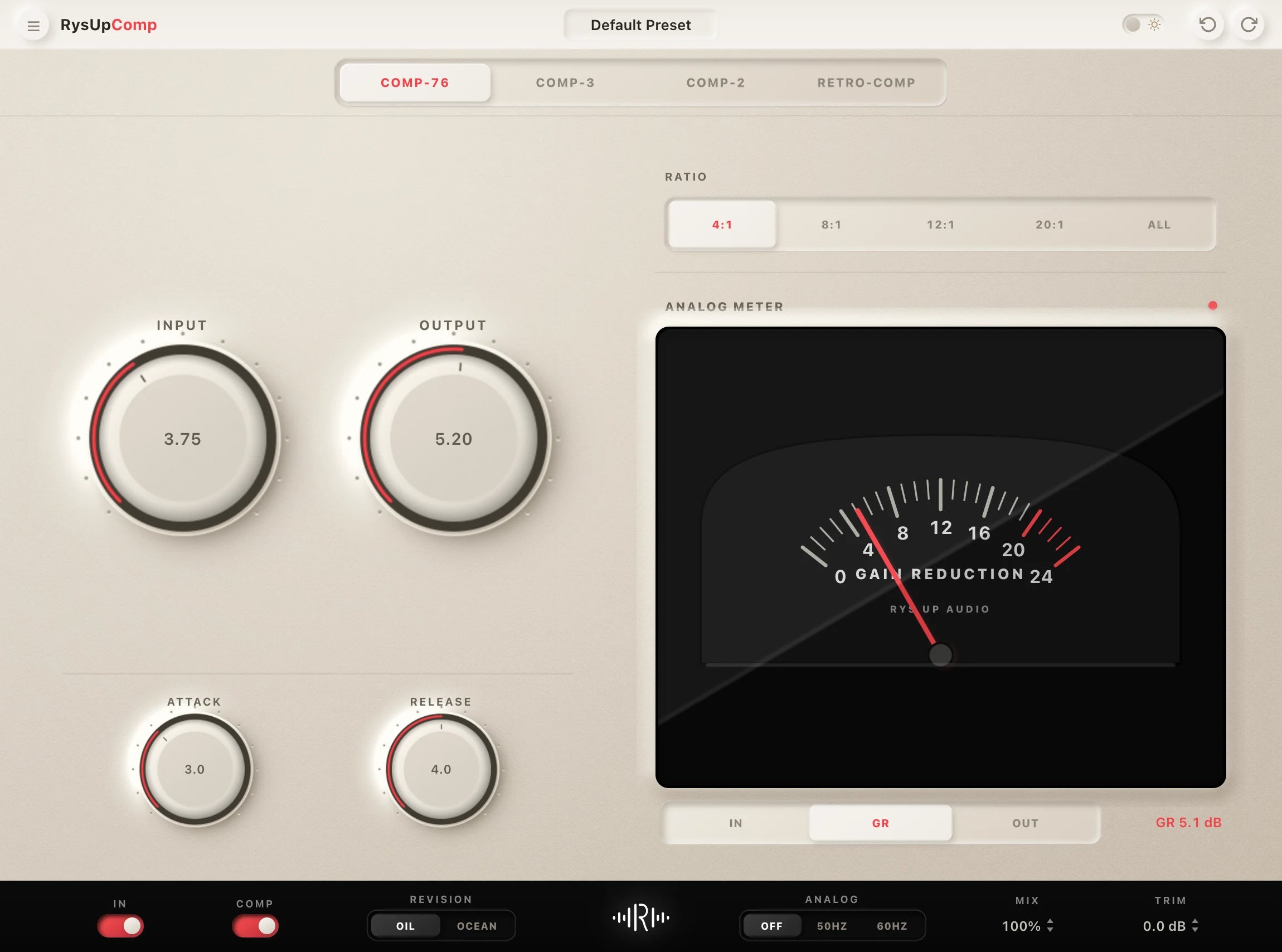
RysUpComp puts four dynamics workflows in one plugin.
- Comp 76 is the fast punch option for urgent vocals and peak control.
- Comp 3 gives firm optical leveling while keeping presence intact.
- Comp 2 gives smoother tube optical control for sustained vocals.
- Retro Comp exposes threshold, ratio, timing, ARC, Opto, and Warm controls for a more direct settings workflow.
The current shipping version is 1.6.10. RysUpComp is $49.99 and ships for macOS and Windows in AU, VST3, and AAX through RysUpHub.
Use serial and parallel compression only when one stage has a clear job
Serial compression means using two lighter stages in sequence. One stage can catch fast peaks while the next smooths phrase movement. Start with 1 to 3 dB of reduction per stage and bypass both together before deciding.
For example, the first stage can use a quicker response and catch only the hardest peaks. The second stage can use a gentler ratio and slower movement to keep phrases in place. Reverse the order when a smooth leveler should feed a faster character stage. The reason for the order must be audible, not visual.
Parallel compression means blending a heavily compressed send under the main vocal. It can add density without removing all articulation from the lead. Compress the send hard, filter it if needed, and raise it until the vocal feels fuller. Then pull it back slightly.
Check the parallel path in mono. Timing differences, added processing, or an accidental dry signal on the return can change the tone when the channels combine. Keep the routing simple and make sure the send is actually adding controlled density instead of duplicate level.
Do not stack processors because a template says so. Use one compressor until you can name the problem that requires another stage.
Fix the compression problem you can actually hear
| Problem | Likely cause | First move |
|---|---|---|
| Vocal sounds flat | Attack too fast or reduction too deep | Slow attack or raise threshold |
| Words still jump out | Attack too slow or input too uneven | Speed attack slightly, then check clip gain |
| Meter never recovers | Release too slow or threshold too low | Shorten release or reduce the amount of compression |
| Breaths and esses jump forward | Low details rose after makeup gain | Edit breaths and de ess after the control stage |
| Bypass sounds better | The vocal did not need this setting | Use less compression or remove it |
Place compression inside the complete vocal chain
A practical starting order is cleanup, subtractive EQ, phrase leveling, compression, de essing, tone shaping, then delay and reverb sends. The exact order can change when the sound demands it.
Use the vocal chain order guide to decide which processors should feed the detector. Use the complete vocal mixing guide when compression is only one part of a larger balance problem.
RysUpSuite is the direct route when you want compression, EQ, de essing, pitch correction, delay, reverb, and the rest of the active paid lineup in one catalog while the subscription remains active.
Vocal compression questions
What ratio is best for vocal compression?
Start around 3:1 for a lead vocal. Use 2:1 for gentler control and 4:1 when the performance needs firmer control. The input and desired movement decide the final ratio.
How much gain reduction should vocals have?
Two to five decibels on stronger words is a useful starting zone for many lead vocals. Use less when the performance is already controlled and more only when the result still sounds intentional.
Should vocal attack be fast or slow?
Use faster attack to catch a sharp front edge and slower attack to preserve articulation. Start around 15 to 30 milliseconds, then move it while listening to the first edge of each word.
Should you level vocals before compression?
Yes when phrase levels are far apart. Clip gain or a vocal rider can reduce the largest differences so the compressor shapes the vocal instead of rescuing each line.
Official sources
- Apple Logic Pro User Guide: Use Compressor
- Avid Pro Tools Reference Guide: Compressor and limiter controls
- RysUpComp product and format details
- RysUpComp current update feed
Sources and product details checked August 30, 2026.
Full range compression is not the answer to every moving tone. Follow this multiband vocal settings guide when one frequency zone changes while the rest of the performance is already controlled.
Track inserts and a shared group bus solve different jobs. Use this vocal bus processing workflow to route doubles and harmonies together, then shape the group without duplicating track-level compression.
Need a faster character insert? RysUpGas combines compression, saturation and presence with five characters and 30 presets for $9.99. Our five character workflow comparison, compression and saturation comparison, and single control loudness comparison explain the different jobs and a fair listening method.