
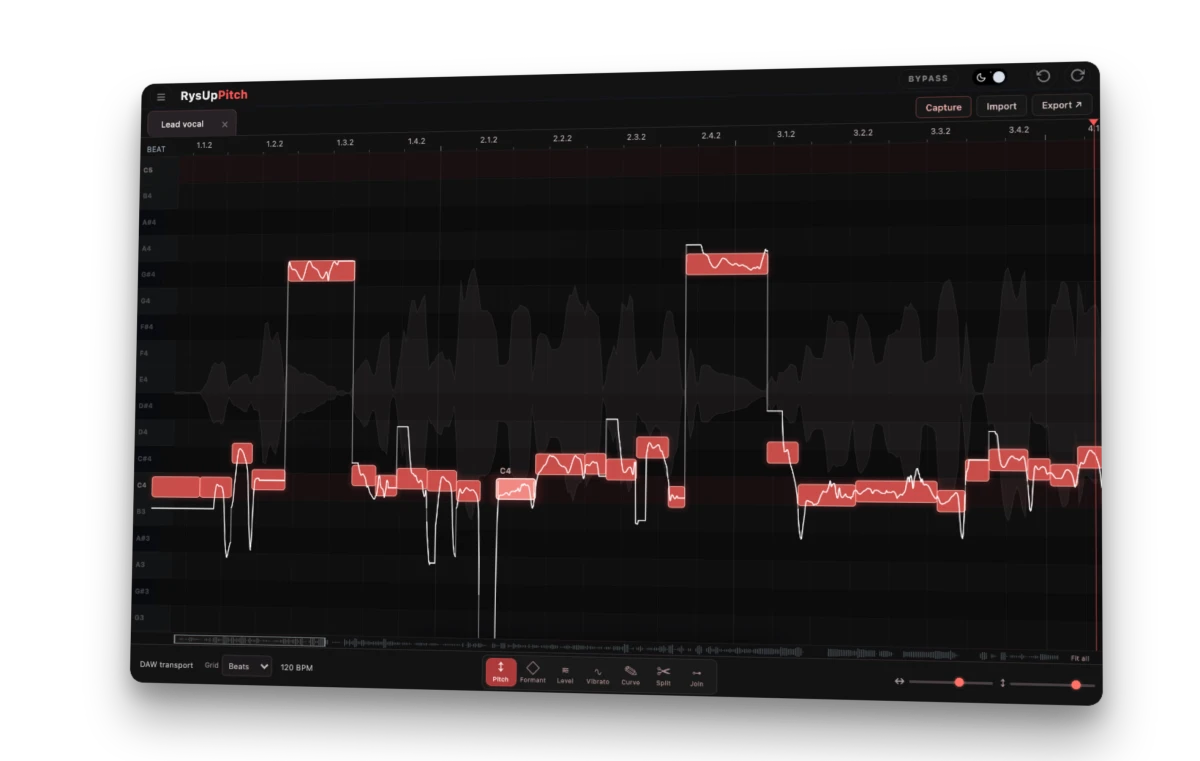
RysUpPitch · $49.99
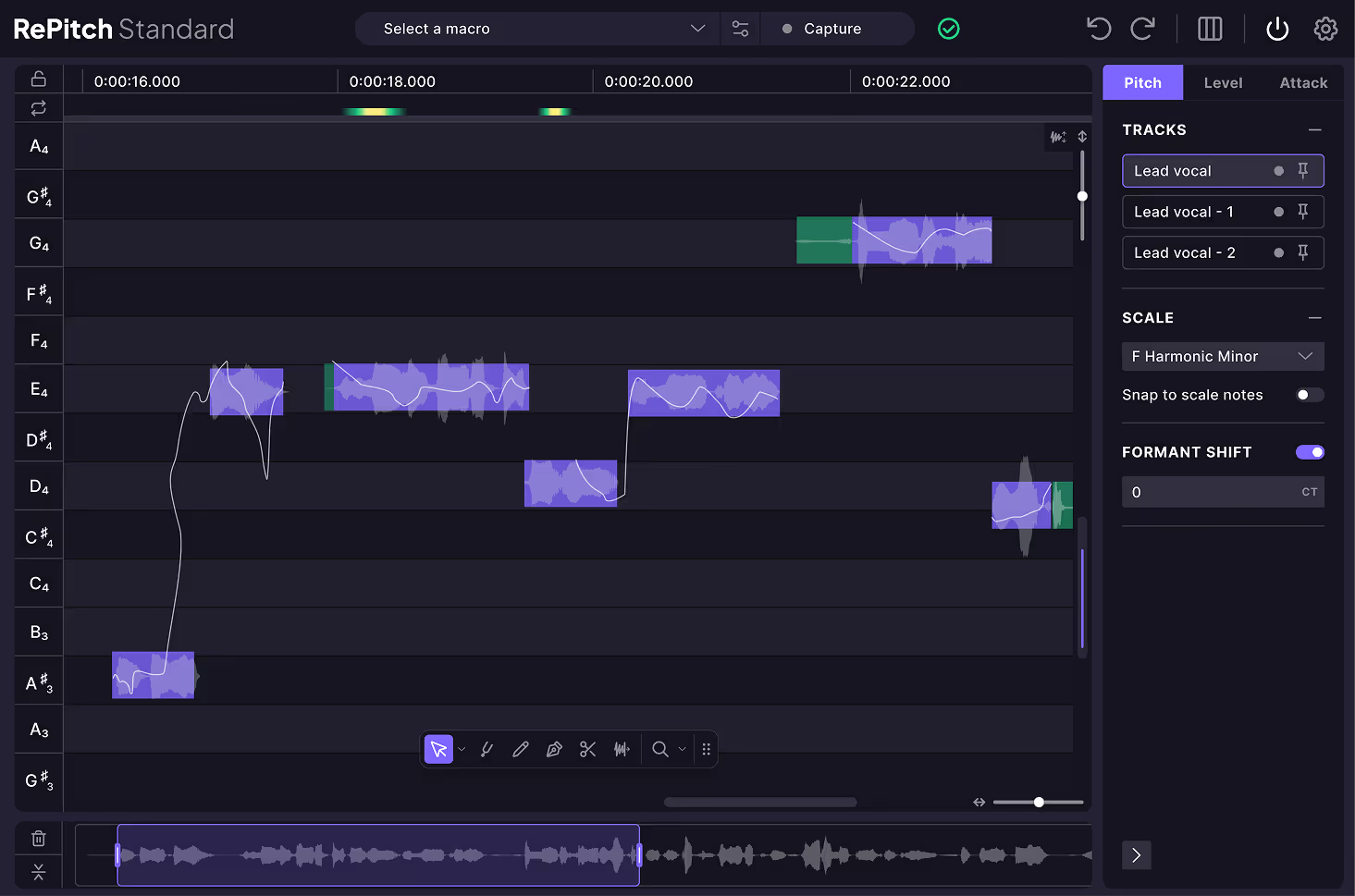
RePitch 2 Standard · View full screenshot
RysUpPitch is a $49.99 RePitch alternative for producers who want to grab a vocal note, fix its pitch, and shape the performance without buying into a bigger editing setup. You get individual pitch, formant, level, drift and vibrato control in a visual editor. RePitch 2 Standard costs $149; Elements costs $69. That makes RysUpPitch $99.01 less than Standard and $19.01 less than Elements at the official prices checked September 19, 2026.
We make RysUpPitch. This comparison explains where our editor earns its place, what RePitch includes, and what to check before moving a session. The goal is a finished vocal—not an impressive receipt.
See RysUpPitch — $49.99 outright →
A RePitch alternative built around the note you need to fix
Think about the edit that actually stops your mix: one sharp word in the hook. A long note that wanders flat. A beautiful take with vibrato that gets too wide at the end. Those problems need decisions at the note level. Flattening the whole performance can remove the part you liked.
RysUpPitch puts the detected notes on a piano roll, with the singer’s pitch trace running through the blobs. Select the problem note, move it, then refine its pitch in cents. The correction stays tied to the part of the performance you chose. You can split a blob when two sounds need separate treatment, or join adjacent notes when they belong together.
The interface keeps detailed controls on the note itself: drift in, vibrato, drift out, gain, fine pitch and formant. You see the phrase you are changing while you change it. The animation below illustrates how note editing works; the interactive interface appears further down the article.
See every note.
Shape the performance.
Watch the moving playhead split the take: raw pitch wanders on the left, corrected notes lock into place on the right.
An animated illustration of note editing, not an audio comparison. Try the interactive preview in this article to explore the actual interface.
RysUpPitch vs RePitch 2: prices and practical differences
Compare the edition you would actually use. RePitch Elements has core tuning tools; Standard adds a wider editing workflow. RysUpPitch includes its note controls in one $49.99 product.
| What matters | RysUpPitch | RePitch 2 Elements | RePitch 2 Standard |
|---|---|---|---|
| Outright price | $49.99 | $69 | $149 |
| Note editing | Pitch, fine pitch, split/join, drift, level and formant | Core pitch, timing, centering and split tools | Expanded editing with Draw, Shaper, Smooth Join, warp points and formant shifting |
| Vibrato workflow | Organic amount or Magic replacement vibrato per note | Core edition; check its tool set against the edits you need | Detailed pitch-curve shaping |
| Working with several takes | Work on the captured or ARA-loaded performance; no claim of RePitch-style multitrack editing | Multi-region editing | Side-by-side multitrack editing |
| Timing workflow | Note edges, internal time handles and selection quantize | Time editing | Time editing plus SmartAttack |
| License activations | One machine at a time; transferable through Hub | Two activations | Two activations |
| Plugin formats | Mac: AU, VST3, AAX. Windows: VST3, AAX. | Mac: AU, VST3, AAX. Windows: VST3, AAX. | Mac: AU, VST3, AAX. Windows: VST3, AAX. |
Sources: RysUpPitch features and price, official RePitch Elements listing, official RePitch Standard listing, and RePitch 2 feature overview. This table compares workflows, not measured audio quality.
See what you are paying to use
RePitch 2 Standard’s larger feature set is real. Its multitrack view and SmartAttack matter when the job involves coordinating several vocal performances. SynchroLink also connects RePitch Standard with VocAlign to carry pitch and timing changes into that alignment workflow. Synchro Arts describes that connection here.
RysUpPitch’s argument is direct: if your job is shaping a lead vocal note by note, you can buy those controls for $49.99. You do not need to justify a larger purchase with features you will barely touch. If your existing sessions depend on SynchroLink or RePitch’s multitrack view, treat those as specific workflow requirements when evaluating a switch.
Fix pitch, drift and vibrato as separate decisions
A held note can begin on pitch, drift down and finish with a wide wobble. Moving the entire note addresses its average pitch; it does not decide how you want the ending to feel. RysUpPitch separates those choices.
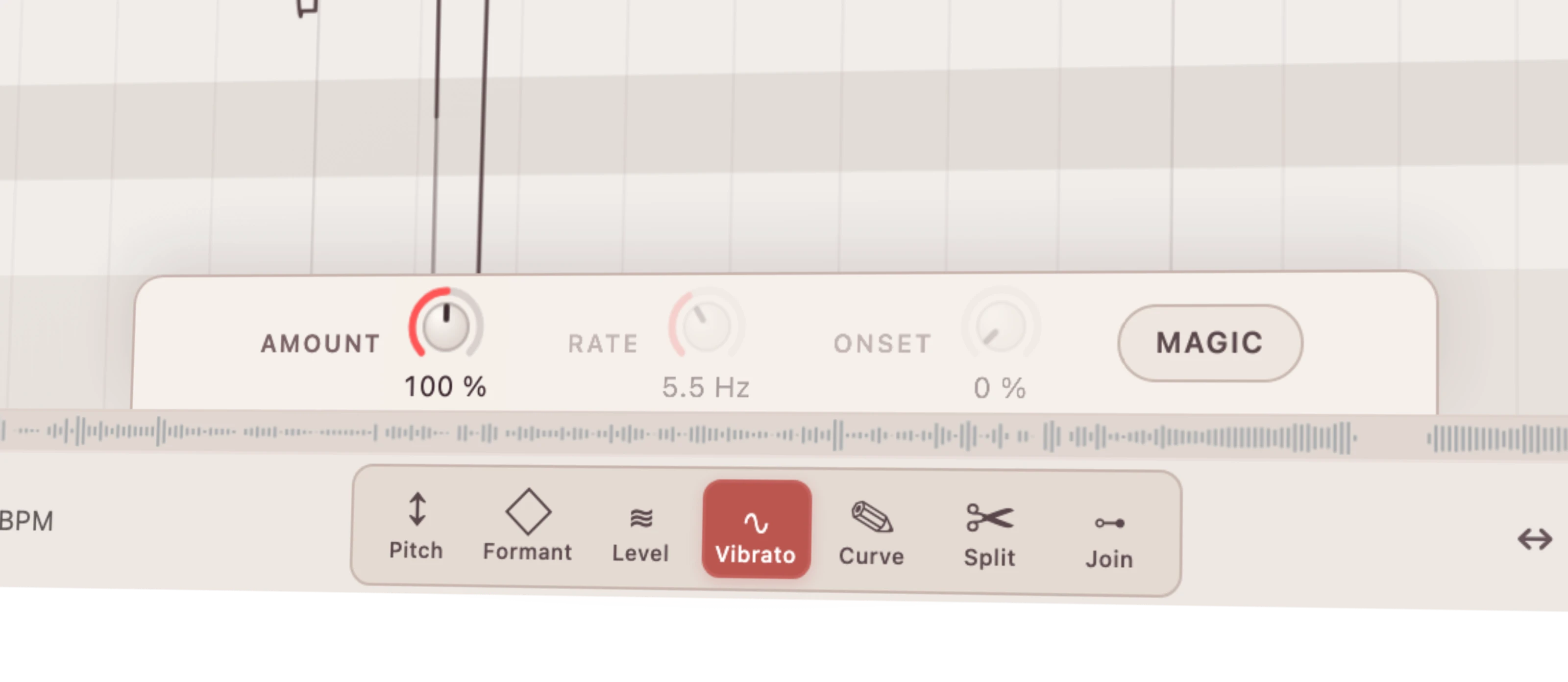
Use the pitch control to place the note. Adjust drift where the phrase wanders. Then decide whether the vibrato needs changing at all. Organic scales the singer’s existing vibrato from 0% to 200%, with 100% retaining its original amount. Magic replaces that wobble with a regular sine pattern whose starting depth, rate and onset come from the detected performance. You can toggle the state per note.
That gives you room for restraint or a deliberate effect. Keep an expressive verse close to the take, then make one sustained hook note more controlled. Use the original comparison and Undo while listening in the arrangement. A perfectly straight line is not automatically a better performance.
Try the controls before you decide

How to move a vocal session without losing your work
Start with one unfinished phrase. Keep the original session and any existing RePitch processing intact until you have checked the replacement. There is no RePitch edit-session importer promised here: moving the original audio does not transfer another plugin’s note decisions.
- Choose the source. Use the unprocessed vocal when you want to make fresh tuning decisions. Rendered tuning is already part of the audio.
- Load the take. Use RysUpPitch through the DAW’s compatible ARA2 workflow, or insert it on the vocal track and use Capture while that section plays.
- Check the detected notes. Split or join where necessary before changing the phrase. Set the intended key or scale when snapping is useful.
- Edit the audible problems. Correct pitch first, then examine drift, vibrato and transitions. Use formant and gain adjustments only where they serve the vocal.
- Check the session. Replay the boundaries, loops and transitions with the instrumental. Save, reopen and verify the edited passage before replacing your previous workflow.
ARA2 support depends on the DAW and how it loads the plugin. Capture is the practical alternative when the host does not bind ARA2. RysUpPitch supports Mac and Windows with compatible AU, VST3 and AAX installations. Choose the format your host loads and verify the exact DAW workflow before replacing an established session.
Who this RePitch alternative is for
RysUpPitch makes a strong case for artists editing their own vocals, producers fixing individual phrases, and small studios that want direct control without a $149 purchase. The price advantage is concrete; whether its workflow suits your material is something to judge on the actual take.
If you already have active RysUpSuite access, RysUpPitch is included. Install it through RysUpHub and put it to work on the next vocal that needs detailed editing.
RePitch alternative FAQ
Is RysUpPitch cheaper than RePitch?
Yes at the official outright prices checked September 19, 2026: RysUpPitch is $49.99, RePitch 2 Elements is $69 and Standard is $149. These are new-purchase prices, not upgrade offers.
Does RysUpPitch replace every RePitch Standard feature?
No. This comparison is about note-level vocal editing. Do not assume a replacement for RePitch’s multitrack view or its SynchroLink connection to VocAlign.
Can I tune while recording with RysUpPitch?
RysUpPitch analyzes a take for detailed editing. For real-time correction while a track plays, see RysUpTune.
Should I also compare Melodyne?
If you are evaluating visual vocal editors, our Melodyne alternative comparison explains the edition and workflow differences to check.
Put the budget into the song
You need control over the vocal—not another expensive purchase you have to talk yourself into. RysUpPitch puts detailed note editing, formant shaping and two vibrato approaches in a $49.99 plugin. Open the interface, check your DAW requirements, and see how it fits the way you finish vocals.
Get RysUpPitch for $49.99 →
RePitch, VocAlign and SynchroLink are names associated with Synchro Arts. This independent comparison is published by Rys Up Audio and is not endorsed by Synchro Arts.