

Last updated September 11, 2026. Features, prices, formats, and license paths were checked against official sources. Vendor pricing can change.
RysUpVox vs Xvox Pro: Which All-in-One Vocal Plugin Fits Your Workflow?
Both plugins are built around the same practical problem: a vocal session can turn into a stack of inserts, routing decisions, and preset windows before the artist hears anything inspiring. RysUpVox and Xvox Pro compress that work into one main vocal processor, but they take different routes.
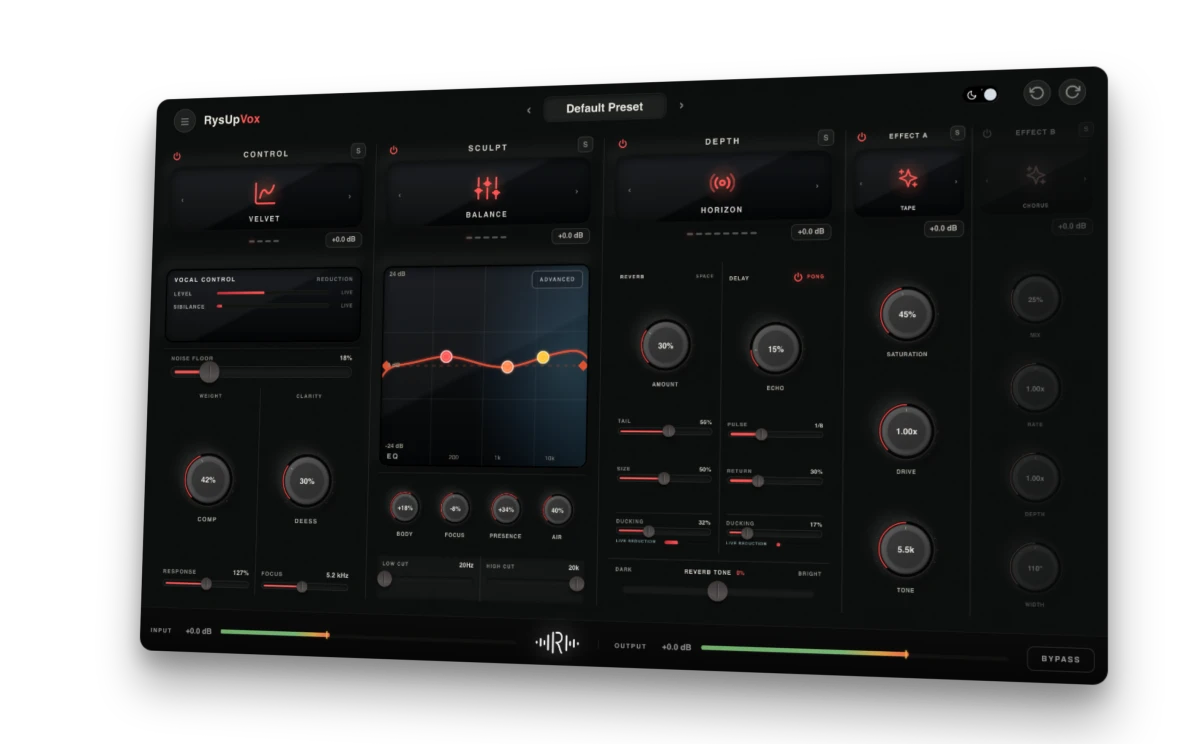
Xvox Pro leans into a broad mode-and-preset ecosystem. RysUpVox focuses on a clean main view with direct access to dynamics, tone, space, and two independent SFX lanes, then opens into deeper EQ control only when you ask for it.
If you still need to choose between stage hardware and a DAW plugin, use the vocal effects processor guide first.
Disclosure: Rys Up Audio makes RysUpVox. Nobody paid us to include Xvox Pro. Nuro Audio also offers lifetime ownership and updates, so the honest Rys Up advantage is the $110 lower price, focused workflow, Suite value, and simple Hub path.
Fast verdict
Choose RysUpVox if you want a focused $49.99 vocal chain with advanced node-based EQ, original lead and ad-lib presets, and two SFX lanes you can combine inside one instance.
RysUpVox vs Xvox Pro at a glance
| Category | RysUpVox | Xvox Pro |
|---|---|---|
| Price snapshot | $49.99 outright | $159.99 on the official page |
| Main workflow | Dynamics, tone, space, SFX A, SFX B | All-in-one processor with 39 advertised modes |
| Detailed EQ | Advanced node editor with addable bands and Q control | Tone processing inside the Xvox ecosystem |
| Creative effects | Two independent SFX lanes in one instance | SFX modes plus included module plugins |
| Preset direction | Original lead, stack, melodic, rap, R&B, pop, and ad-lib sounds | 250-plus presets advertised |
| Formats | AU, VST3, AAX on macOS and Windows | AU, VST3, AAX on macOS and Windows |
| License | Lifetime license, RysUpHub activation, no dongle | Lifetime license with free lifetime updates |
The biggest workflow difference: two SFX lanes
A lot of vocal processors give you one creative slot. That is enough until you want a wider chorus after saturation, a telephone filter with a pitch move, or a doubler that still needs a darker tone. RysUpVox splits the creative section into SFX A and SFX B. Each lane can run its own mode and controls, so combinations stay inside the same vocal chain.
That matters most on ad-libs and hook stacks. The lead can stay controlled and intelligible while a second instance becomes the texture chain. You do not have to remember which four plugins made the sound.
Simple EQ up front, advanced EQ on demand
The main RysUpVox view keeps Low, Mid, High, and Air controls visible with dedicated low-cut and high-cut handles. Double-click the analyzer and the tone section expands into a larger EQ editor. Click empty space to add a band, drag nodes for frequency and gain, and shape Q from the selected-band control.
This is the part of RysUpVox that rewards repeat use. A new user can load a preset and move four sliders. A mixer can open the same preset and make a narrow correction without adding another EQ plugin.
Dynamics and space
RysUpVox puts gate, gain-reduction, de-essing, compression, and target controls in one dynamics section. The Space section separates reverb and delay amounts while exposing useful secondary values: reverb time and size, delay rate and feedback, ducking meters, and a reverb-tone track.
Xvox Pro also covers the full vocal-chain category and advertises dedicated Comp, DS, Tone, Space, and SFX companion plugins. If splitting modules into separate inserts is important, that bundle structure is a legitimate advantage. RysUpVox is aimed at the opposite preference: keep the vocal chain together until there is a clear reason to break it apart.
Price and ecosystem
RysUpVox is $49.99 outright. It is also included in RysUpSuite, which unlocks the current Rys Up plugin catalog and future releases while the subscription is active. Xvox Pro was listed at $159.99 when checked.
The price gap is not a claim that every feature is identical. It is a decision about where you want the value. Xvox Pro emphasizes a larger named mode and preset ecosystem. RysUpVox puts the money into a flexible core chain, two creative lanes, advanced EQ, and the broader Rys Up catalog.
Which one should you buy?
- RysUpVox is the Rys Up choice for the dual SFX workflow, deep EQ, Hub path and Suite value described here.
- Try the workflow, not the feature count. The best vocal processor is the one that gets you from raw take to believable record without breaking the session.
If you want a complete DAW-ready starting point instead of building the chain from scratch, browse the vocal preset collection by recording software.
Get RysUpVox with the full Suite from $9.99 a month.
Or own RysUpVox for $49.99. Compare the best complete vocal chain plugins, see the full Rys Up lineup, or open the RysUpHub installer page.
Need a robot hook instead of a complete vocal chain? Compare these current free vocoder plugin downloads before adding another paid tool.
Try the focused Rys Up workflow
Open RysUpVox before you choose the larger bundle
Use the comparison to understand the tradeoffs, then inspect the current RysUpVox interface, included vocal modes, supported formats, and purchase options on the product page.
Open RysUpVox
The bottom line
Every plugin on this page does the job. Only one of them is RysUpVox — one price, paid once, no subscription and no dongle.