
The best distortion plugin is not the one with the longest feature list. It is the one that gives the vocal the right amount of edge without making the words smaller, harsher, or harder to mix.
For some producers, that is Soundtoys Decapitator. For others, it is FabFilter Saturn 2, iZotope Trash, or the free Softube Saturation Knob. RysUpDistortion belongs in this comparison because it takes a different route: a focused character saturator with a controllable feedback path, sidechain behavior, EQ, and output dynamics for $49.99.
Disclosure: Rys Up Audio makes RysUpDistortion. Competitor features, formats, and prices below were checked against official product and shop pages on July 15, 2026. This is not a claim that one plugin beats every other plugin. Each one is better at a different job.
The short answer
- Best fast analog style color: Soundtoys Decapitator.
- Best deep multiband distortion system: FabFilter Saturn 2.
- Best for aggressive sound design: iZotope Trash.
- Best free simple saturation: Softube Saturation Knob.
- Best lower priced feedback and character workflow: RysUpDistortion.
If you already own Decapitator and it gives you the vocal grit you want in ten seconds, keep using it. If you need six bands and elaborate modulation, Saturn 2 is the more capable tool. If you want to destroy and rebuild a sound, Trash goes further. If all you need is a little warmth, the free Softube knob may be enough.
RysUpDistortion makes the most sense when you want drive plus movement from a filtered feedback path, but do not want to spend $149 to $199 or use iLok. It is not a Decapitator clone, and it is not a cut price Saturn 2.
Distortion plugins compared
| Plugin | Price checked July 15 | Best at | Main limitation | Formats |
|---|---|---|---|---|
| Soundtoys Decapitator | $199 | Fast analog style saturation with five models | No multiband processing or detailed modulation system | Mac and Windows AU, VST2, VST3, AAX |
| FabFilter Saturn 2 | $149 | Precise multiband distortion and modulation | More setup than a one knob color tool | Mac and Windows VST, VST3, AU, CLAP, AAX |
| iZotope Trash | $99 | Extreme distortion, multiband processing, and convolution | Can be more tool than a straightforward vocal needs | Mac and Windows AU, VST3, AAX |
| Softube Saturation Knob | Free | Simple warmth with three frequency modes | Limited shaping; requires Softube Central and an iLok account | Mac and Windows AU, VST, VST3, AAX |
| RysUpDistortion | $49.99 ownership or Suite from $9.99/mo on annual billing | Character drive plus filtered, sidechain controlled feedback | Not a six band modular system like Saturn 2 | Mac AU, VST3, AAX; Windows VST3, AAX |
1. Soundtoys Decapitator: best for fast analog style color
Decapitator is popular for a good reason. It puts five analog saturation models behind a small set of controls, then lets you push harder with Punish. The Tone control moves quickly from darker to brighter color, and the Mix control makes parallel distortion easy without extra routing.
On a lead vocal, that speed matters. You can add density, pull the tone slightly dark if the top gets sharp, and blend the result under the dry signal. Decapitator is also easy to reuse on bass, drums, guitars, and synths.
The tradeoff is price and scope. At $199, you are paying for a mature, familiar analog color workflow. It does not give you Saturn 2 style multiband control, Trash style convolution, or the feedback movement inside RysUpDistortion. Buy it because you like its sound and speed, not because the name appears in every roundup.
2. FabFilter Saturn 2: best for multiband control
Saturn 2 is the strongest choice here when detailed control matters more than immediacy. FabFilter lists 28 distortion styles, up to six processing bands, per band drive, mix, feedback, dynamics, tone, and level controls, plus an extensive modulation system.
That makes it excellent for difficult vocals. You can keep the low mids controlled, add texture to the presence range, and treat the air band differently. It can also create movement that follows the performance instead of applying the same distortion to every part of the signal.
The downside is obvious: all that control gives you more ways to overwork a sound. If your real goal is simply “make this vocal feel less sterile,” Saturn 2 may slow you down. Its official US shop price was $149 when checked for this article.
3. iZotope Trash: best for creative destruction
Trash is the sound design option. iZotope combines more than 60 distortion types with multiband processing, its Convolve module, envelope following, filtering, and oversampling. The product page describes more than 600 available distortion and impulse response combinations.
For a normal lead vocal, that can be excessive. For ad libs, transitions, parallel layers, whispered doubles, and effects throws, it is exactly the point. Trash can turn a clean recording into a speaker, cabinet, metallic texture, broken radio, or something that no longer sounds like a vocal at all.
At $99, it sits between RysUpDistortion and the two premium options in this list. There is also a free Trash Lite. Start there if you are curious about the workflow and do not need the full feature set.
4. Softube Saturation Knob: best free simple option
Softube Saturation Knob is one large amount control plus three modes: Keep High, Neutral, and Keep Low. That is enough to warm a vocal, add a little body, or rough up a parallel bus. It is free, and the lack of options is part of the appeal.
It is not the right choice if you want detailed filtering, multiband processing, feedback, or modulation. It also is not completely frictionless. Softube says installation uses Softube Central and requires both a Softube account and a free iLok account.
Still, free is free. If Saturation Knob solves the problem, there is no honest reason to buy a more complicated plugin.
5. RysUpDistortion: best for lower priced character and feedback
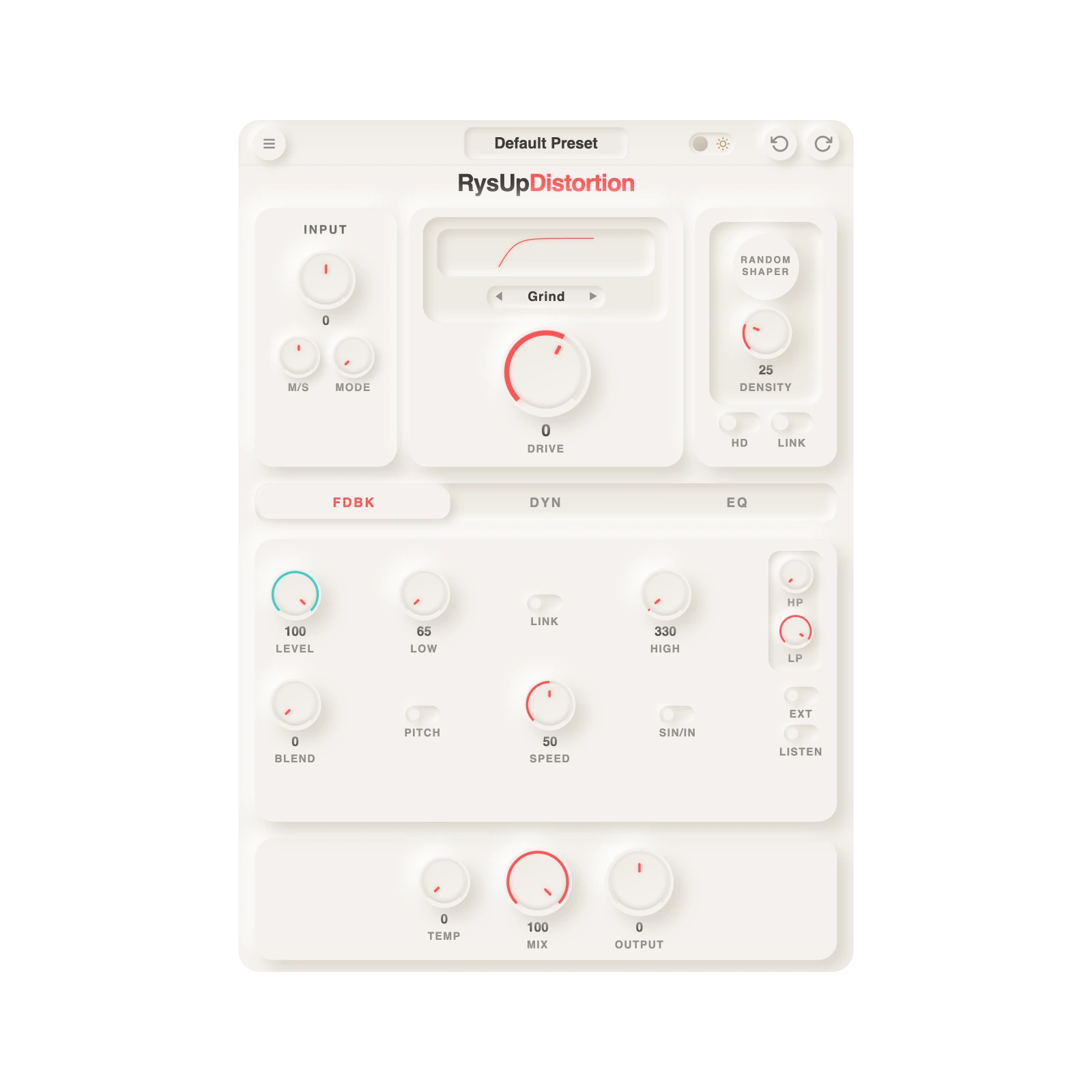
RysUpDistortion starts as a character saturator, then goes somewhere the simpler options do not. Its feedback section can be blended, filtered, pitch shifted, and shaped for speed. The sidechain input can control that behavior so the effect moves around the source instead of covering it.
That is useful on vocals because distortion often needs motion. A static drive setting can make every word equally dense. Feedback that reacts to the performance can stay quieter around important transients and become more obvious in spaces, tails, or emphasized phrases. The built in EQ and output dynamics help keep that movement from taking over the mix.
The current public update feed lists version 1.0.13 for Mac and Windows. Mac installers include AU, VST3, and AAX. Windows installers include VST3 and AAX. The plugin costs $49.99 to own, uses RysUpHub and a Rys Up license key, and does not require iLok.
Here is the blunt part: if you need six independent bands and a large modulation environment, buy Saturn 2. If you want Decapitator's five specific analog models, buy Decapitator. If you want convolution and extreme sound design, Trash is stronger. RysUpDistortion is for the producer who wants character, feedback movement, a lower price, and a simpler license path.
How to test distortion plugins on a vocal
- Start with a dry vocal that already has basic cleanup. Distortion exaggerates harshness, noise, breaths, and bad edits.
- Match loudness. Turn the output down after adding drive. Louder almost always feels better in a quick comparison.
- Test inside the beat. A huge distorted vocal in solo can disappear once the drums and synths return.
- Listen to consonants. If S, T, and K sounds become distracting, use less drive, darken the distortion, or place de-essing after it.
- Try parallel processing. Blend a heavily distorted signal under the clean lead instead of forcing one insert to do everything.
- Use three sections. Check a quiet verse, a loud hook, and a held note. The best setting should survive all three.
A useful starting point is to set every plugin more aggressively than you think you need, match the output level, then back the Mix or amount down until you mostly miss it when bypassed. Distortion on vocals usually works better as support than as an announcement, unless the effect is the point.
Which distortion plugin should you buy?
Choose based on the work you actually do:
- Choose Decapitator for familiar analog style color and a fast interface.
- Choose Saturn 2 for precision, multiband shaping, and deep modulation.
- Choose Trash for experimental vocal effects and aggressive sound design.
- Choose Saturation Knob if you want free, simple warmth and do not mind the account setup.
- Choose RysUpDistortion for feedback movement, sidechain control, built in cleanup, no iLok, and a $49.99 ownership price.
Do not buy five distortion plugins because five lists told you to. Download demos where available, level match them, and keep the one that makes your vocal easier to finish.
Try RysUpDistortion in your vocal chain
Subscribe to the Rys Up Suite to unlock the current plugin catalog from $9.99 per month on annual billing, or own RysUpDistortion for $49.99.
Sources checked July 15, 2026
- RysUpDistortion product page and live RysUpDistortion update feed
- Soundtoys Decapitator official product page
- FabFilter Saturn 2 official product page and official US shop
- iZotope Trash official product page
- Softube Saturation Knob official product and installation page
Prices and offers can change after the source check date. Check each official cart before purchasing.